
Purchase Invoice
This section contains different types of invoices used in purchasing processes. Each document type is selected according to the nature of the purchase and ensures accurate management of accounting and inventory processes.
PURCHASE INVOICE TYPES
This section contains different types of invoices used in purchasing processes. Each document type is selected according to the nature of the purchase and ensures accurate management of accounting and inventory processes.
Invoice Types
1.Purchase Invoice: This is the standard purchase invoice used for physical products purchased from the supplier. Stock entries are finalized with this document
2.Service Received Invoice:It is used for service purchases, not physical products (e.g. consultancy, maintenance, transportation)
3.Purchase Return Invoice:Issued if previously purchased products are returned to the supplier
4. Received Price Difference Invoice: It is used to reflect the price differences that occur later on the previously issued invoice (exchange rate difference, increase difference, etc.)
5. Received Proforma Invoice: This is an unofficial, preliminary informational invoice. It usually replaces an offer
6.Purchase Receipt:It is a type of document that replaces an invoice and is used for simpler and faster transaction recording
7. Expense Receipt: Used for purchases made from non-taxpayers
8.Import Invoice: This is the invoice used for purchases made from abroad. Covers foreign exchange and customs processes
9. Producer Receipt: It is a special type of document used in purchases from farmers and includes withholding tax
10. Pre-Purchase Service Invoice: It is an invoice for advance or prepayment purposes issued before the service purchase takes place
General Purpose
- Managing different purchasing scenarios with the right document
- Running accounting and inventory processes correctly
- Correctly applying tax obligations
- Making the purchasing process standard and controlled
GOODS PURCHASE INVOICE
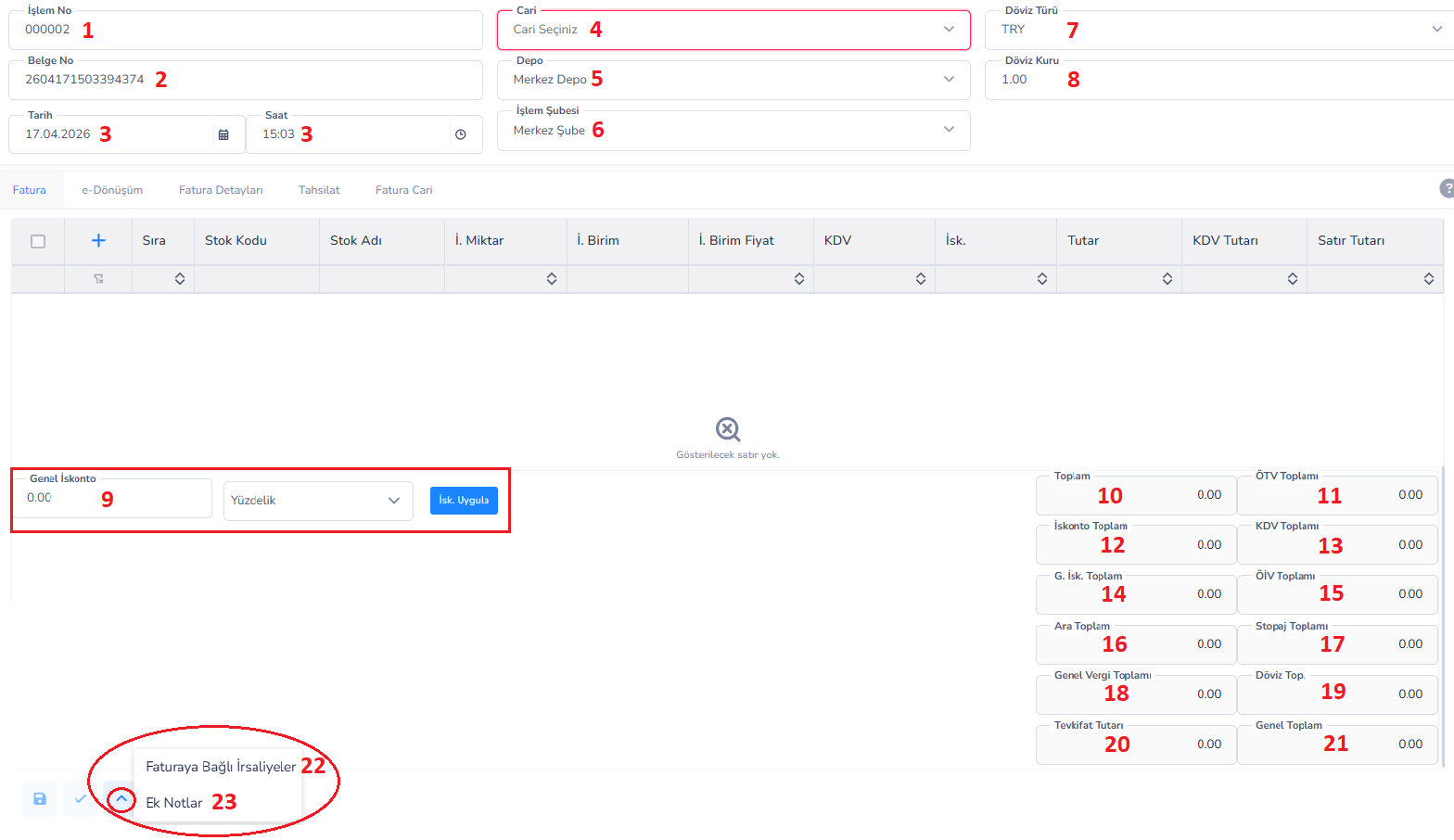
Goods Purchase Invoice is the document in which the products purchased from suppliers are recorded financially and the purchasing process is completed accounting.
Header Information Fields:
1.Transaction Number:This is the transaction number given automatically by the system.
2.Document Number:This is the document number of the invoice.
3.Date / Time:The date and time the invoice was issued.
4.Current:The supplier company from which the invoice was issued is selected.
5.Warehouse:This is the warehouse information where the products enter.
6.Transaction Branch:The branch to which the transaction is linked is selected.
7.Currency Type:Currency used in the transaction (TRY, USD, etc.).
8.Exchange Rate:Exchange rate information is entered for foreign currency transactions.
Invoice Lines:
- Stock Code / Stock Name:Purchased product information.
- I. Quantity:The amount of product purchased.
- I. Unit:Product unit (piece, kg, etc.).
- I. Unit Price:The purchase price of the product.
- VAT:Tax rate.
- Discount:Line-based discount rate or amount.
- Amount:Excludes VAT (Quantity x Unit Price).
- VAT Amount:Calculated VAT amount.
- Line Amount:Total line amount including VAT.
Subfields (Totals):
9.General Discount: Discount applied throughout the document.
10.Total:Net total amount.
10.SCT Total: Total of special consumption tax, if any.
12.Discount Total: Total discount amount.
13.VAT Total: Total VAT amount.
14.G. Isk. Total (General Discount Total):The sum of the discount amount applied throughout the document. Shows the overall discount effect, separate from line discounts.
15. SCT Total:Sum of Special Communication Tax. If SCT is applied to the transaction, it will be shown in this field.
16.Subtotal:This is the provisional total amount before discounts and some additional taxes are applied. It usually represents the total of line amounts excluding VAT and is used as an intermediate value for final calculations.
17.Withholding Total: Total of withholding tax, if any.
18.General Tax Total: The total of all taxes.
19. Total Foreign Currency: If the transaction is in foreign currency, it shows the foreign currency equivalent of the total amount.
20.Withholding Amount: VAT withholding, if any.
21.Grand Total: Final amount to be paid.
Additional Operation Area (Submenu):
19.Delivery Notes Linked to the Invoice: Displays the delivery notes linked to the invoice and enables association.
20.Additional Notes:This is the field where additional explanations about the invoice are entered.
Tabs:
- Invoice:This is the main login screen.
- e-Conversion:This is the tab where e-Invoice settings are made.
- Invoice Details: Field where description, project and special code information is entered.
- Collection: The tab where payment and collection transactions are recorded.
- Invoice Current: The tab containing detailed information about the supplier.
Process Specific Features:
- Stock entries are finalized
- Debit occurs in the current account
- Tax and accounting records are processed
- Can work in conjunction with delivery note
- Included in financial reporting
General Purpose:
- Formalizing purchases
- Providing inventory and accounting integration
- Making tax calculations correctly
- To follow up current debt
Process Flow:
- Request → Offer → Order → Delivery note → Purchase Invoice
E-TRANSFORMATION TAB
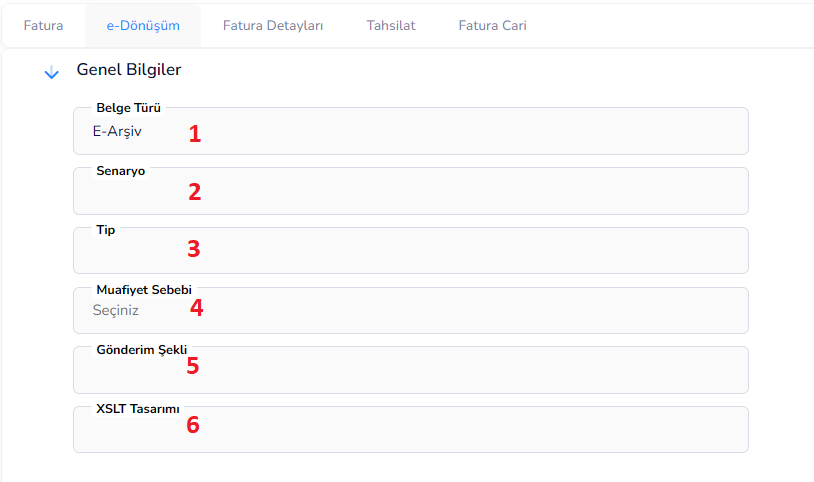
e-Transformation tab is the area used to create, send and manage invoices electronically (e-Invoice / e-Archive). This section ensures the issuance of documents in accordance with the Revenue Administration (GİB) standards.
General Information:
1.Document Type: Specifies the type of electronic document to be created.
(Example: e-Archive, e-Invoice)
Scenario 2: Determines the sending scenario of the document.
(Basic Invoice, Commercial Invoice, etc.)
Type 3: Indicates the type of the document.
(Standard, return, exception, etc.)
4. Reason for Exemption: If there is a tax exemption, the reason is selected.
(Example: VAT exemption, export, etc.)
5.Sending Method: Determines how the invoice will be delivered to the recipient.
(E-Mail, integrator, portal, etc.)
6.XSLT Design: It is the visual design template of the invoice.
(PDF or printout view)
General Purpose:
- Invoices are created electronically
- Compliance with IOP standards is ensured
- The document is transmitted digitally to the other party
- Paperless accounting process is managed
INVOICE DETAILS TAB
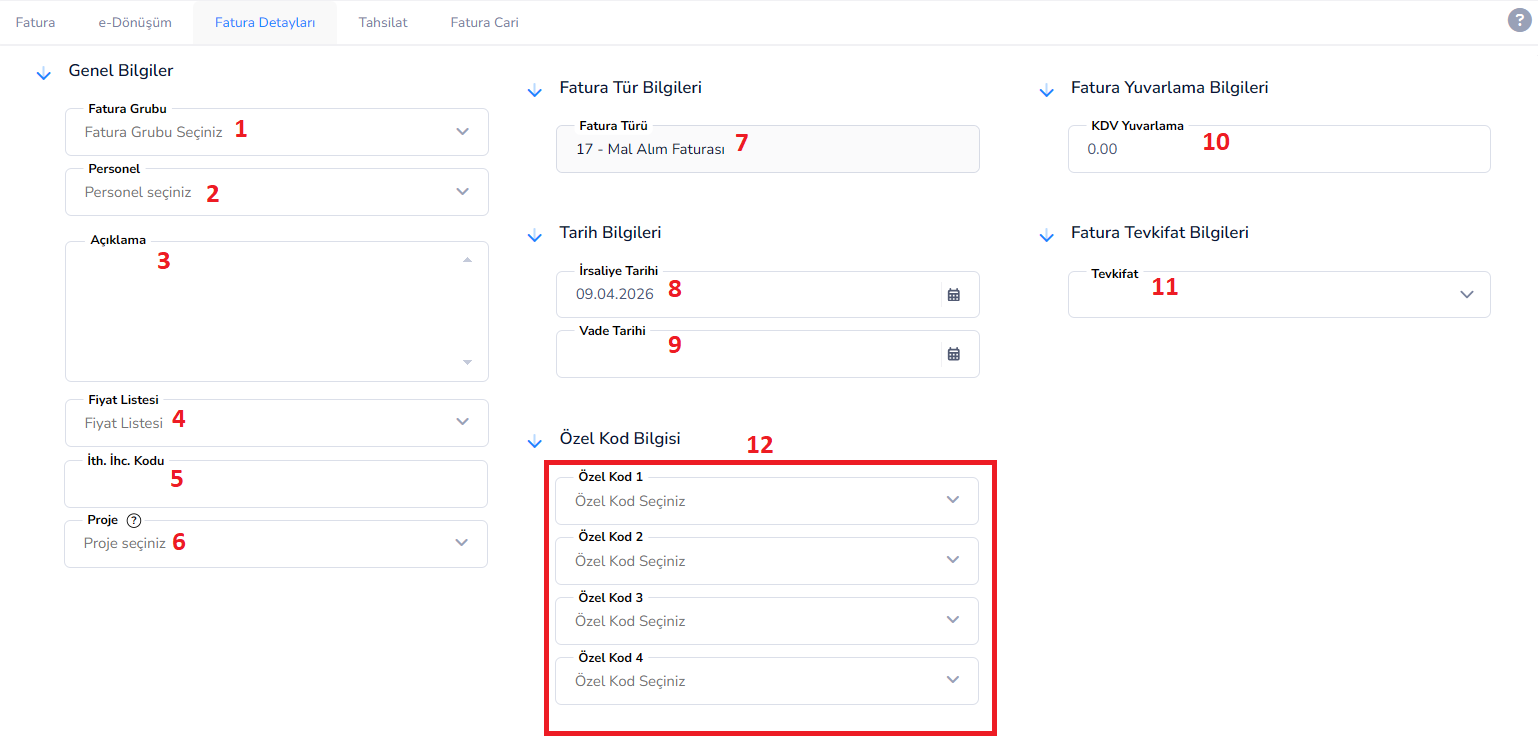
Invoice Details tab is the area where additional invoice information, historical data, classifications and tax settings are made. This section allows more detailed management and reporting of the invoice.
General Information:
1st Invoice Group: Determines the category to which the invoice belongs. (Ex: Domestic, import, service, etc.)
2.Personnel: The person who performs the operation or is responsible is selected.
3.Explanation: This is the field where general notes about the invoice are entered.
4.Price List: Selection of the price list to be used in the invoice.
5.Ith. Ihc. Code:This is the special code field used for import / export transactions.
6.Project: Project information to which the invoice is linked.
7.Invoice Type: Indicates the type of the document in the system. (Example: 17 – Goods Purchase Invoice)
8.Delivery Note Date:The date of the delivery note attached to the invoice.
9.Maturity Date: The last date on which payment will be made.
10. VAT Rounding: Used to adjust fraction differences in VAT calculations.
11.Withholding: The VAT withholding rate to be applied to the invoice is selected.
12.Special Codes: Used to classify the invoice.
General Purpose:
- Invoices are categorized in detail
- Tax and financial settings are checked
- Project and operation based monitoring is done
- Data infrastructure is created for reporting and analysis
COLLECTION TAB

General Description
The Collection tab is the area where invoice-related payment and financial transactions are recorded and displayed. This section keeps track of how and in what manner the invoice is paid.
Thanks to this tab, payment transactions (cash, bank, check, bill of exchange, etc.) for the relevant invoice are entered into the system and associated with the current account. Thus, debt tracking and payment plan is controlled.
Fields:
1st Sequence Number: Indicates the order of collection records.
2.Document Name: Indicates the type of payment transaction made. (Ex: Collection Receipt, Bank Transaction, Check, etc.)
Date 3: The date the payment was made.
4.Withdrawal Type: Payment method. (Cash, money order, credit card, check, promissory note, etc.)
5th Withdrawal Installment: Indicates whether the payment is in installments.
6. Document Description: Explanation or note information about the transaction.
7.Amount:Amount of payment made.
8.Invoice Type: Indicates the type of invoice paid.
9.Invoice ID:Invoice reference number in the system.
10.Document ID:System reference number of the collection transaction.
11.Document Type: Type of payment document.
General Purpose:
- Invoice payments are tracked in detail
- Current account debit/credit status is checked
- Payment history is recorded
- Finance and accounting processes work integrated
INVOICE CURRENT TAB
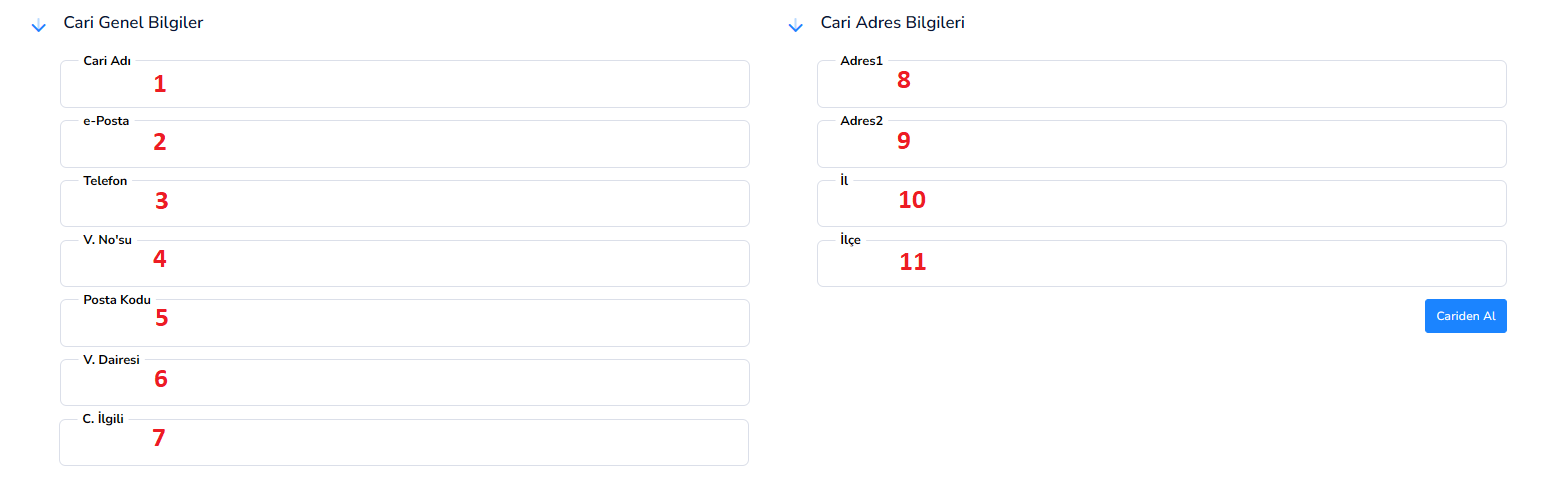
Invoice Current tab is the area where the supplier (current) information and address details of the invoice are displayed and edited. This section ensures that the invoice is created with correct current information.
Current General Information:
1.Client Name: The name of the supplier company to which the invoice belongs.
2.E-Mail:The e-mail address of the company.
3rd Phone: Supplier contact number.
4.V. No (Tax Number): Tax identification number of the company.
5.Zip Code: Zip code information of the address.
6.V. Office (Tax Office): The tax office to which the company is affiliated.
7.C. Relevant: Authorized person information within the company.
8.Address 1: Primary address information of the company.
9.Address 2: Additional address details.
10th Province: The province where the company is located.
11th District: The district where the company is located.
Transaction Button:
12.Retrieve from Client: Automatically brings the information of the selected client card to this field.
General Purpose:
- Supplier information is recorded completely
- Invoices use correct address and tax information
- The correct connection is established between the current account and the invoice
- Manual data entry errors are minimized
OTHER TYPES OF PURCHASE INVOICES (SUMMARY)
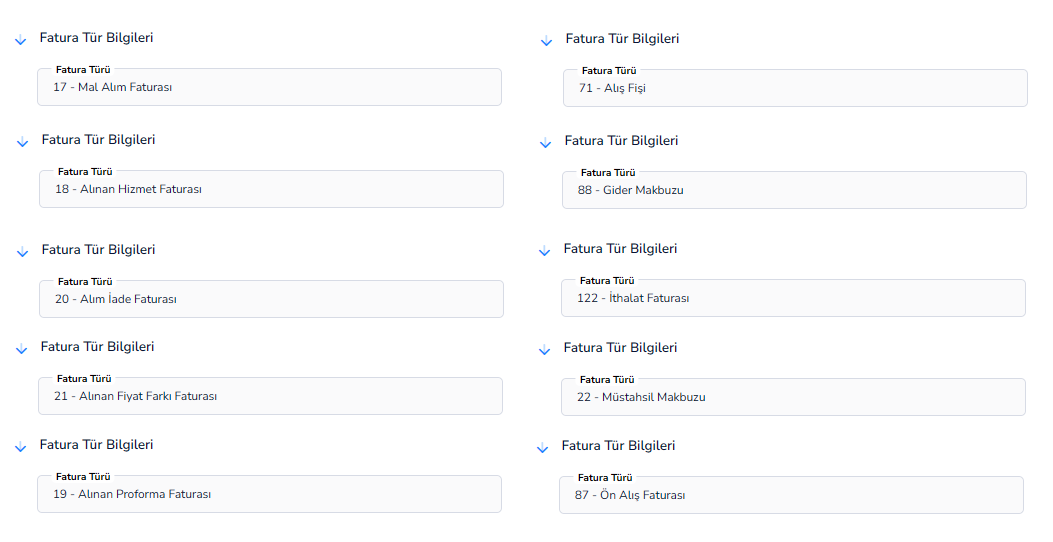
- Goods Purchase Invoice:It is the standard invoice type in which the stock items purchased by the business from suppliers are recorded. With this document, both stock entries are made and a debt is created in the current account.
- Service Received Invoice: This is a type of invoice in which service purchases are recorded instead of a physical product. It is used in the accounting of services such as consultancy, maintenance and rent and does not create stock movements.
- Purchase Return Invoice: This is the type of invoice used in case of returning previously purchased products. With this transaction, the stock is withdrawn and the debt in the relevant current account is reduced.
- Received Price Difference Invoice: It is used to reflect price changes that occur after the purchase into the system. It is especially preferred in cases of exchange rate differences, agreement changes or additional costs.
- Received Proforma Invoice: This is a document prepared for informational purposes before the actual invoice is issued. It is generally an offer and does not create an accounting record.
- Purchase Receipt: It is a simpler type of document that replaces an invoice. It is used for small-scale purchases or transactions that require quick recording and creates a basic financial record.
- Expense Receipt: Enables recording of expenses incurred in cases where invoices cannot be issued. It is used for self-employment payments or expenses that cannot be documented.
- Import Invoice: This is the type of invoice used for purchases of goods from abroad. It includes accounting and tax calculations specific to foreign exchange, customs and import processes.
- Producer Receipt: It is a special type of document used in purchases from farmers. Tax deductions (such as withholding tax) are automatically calculated and a record appropriate to these transactions is created.
- Preliminary Purchase Invoice: It is a purchase document that has not yet been finalized or is created for pre-registration purposes. It can be converted into a final invoice at later stages of the process.
General Logic:
- The Invoice Type field is automatically updated by the system according to the document type selected by the user and adapted to the relevant transaction type.
- Depending on the selected invoice type, inventory transactions, current account impact, tax calculations and accounting postings work differently.
Bu doküman yardımcı oldu mu?
Eksik veya geliştirilmesi gereken bir bölüm varsa destek ekibimizle paylaşabilirsiniz.