
Purchase Orders
This section includes delivery note types in which goods receipts are recorded according to different scenarios during the purchasing process. Each category is used individually according to the different supply and logistics needs of the business.
PURCHASE DISPATCH TYPES
This section includes delivery note types in which goods receipts are recorded according to different scenarios during the purchasing process. Each category is used separately according to the different supply and logistics needs of the business.
Categories:
1.Consignment Goods Entry Delivery Note
It is used for the entry of products received from the supplier as consignment.
Ownership remains with the supplier, and the purchase takes place after use.
2.Goods Purchase Return Delivery Note
It is used when previously purchased products are returned to the supplier.
Faulty, incomplete or defective products are sent back with this document.
3. Goods Purchase Delivery Note
It is the basic delivery note type used in standard product entry transactions.
Normal goods acceptance to the warehouse is recorded with this document.
4.Goods Purchase Delivery Note (VAT Included)
It is a type of delivery note in which product prices are recorded including VAT.
It is preferred in cases where pricing is based on VAT.
CONSIGNED GOODS RECEIPT DISPATCH NOTE
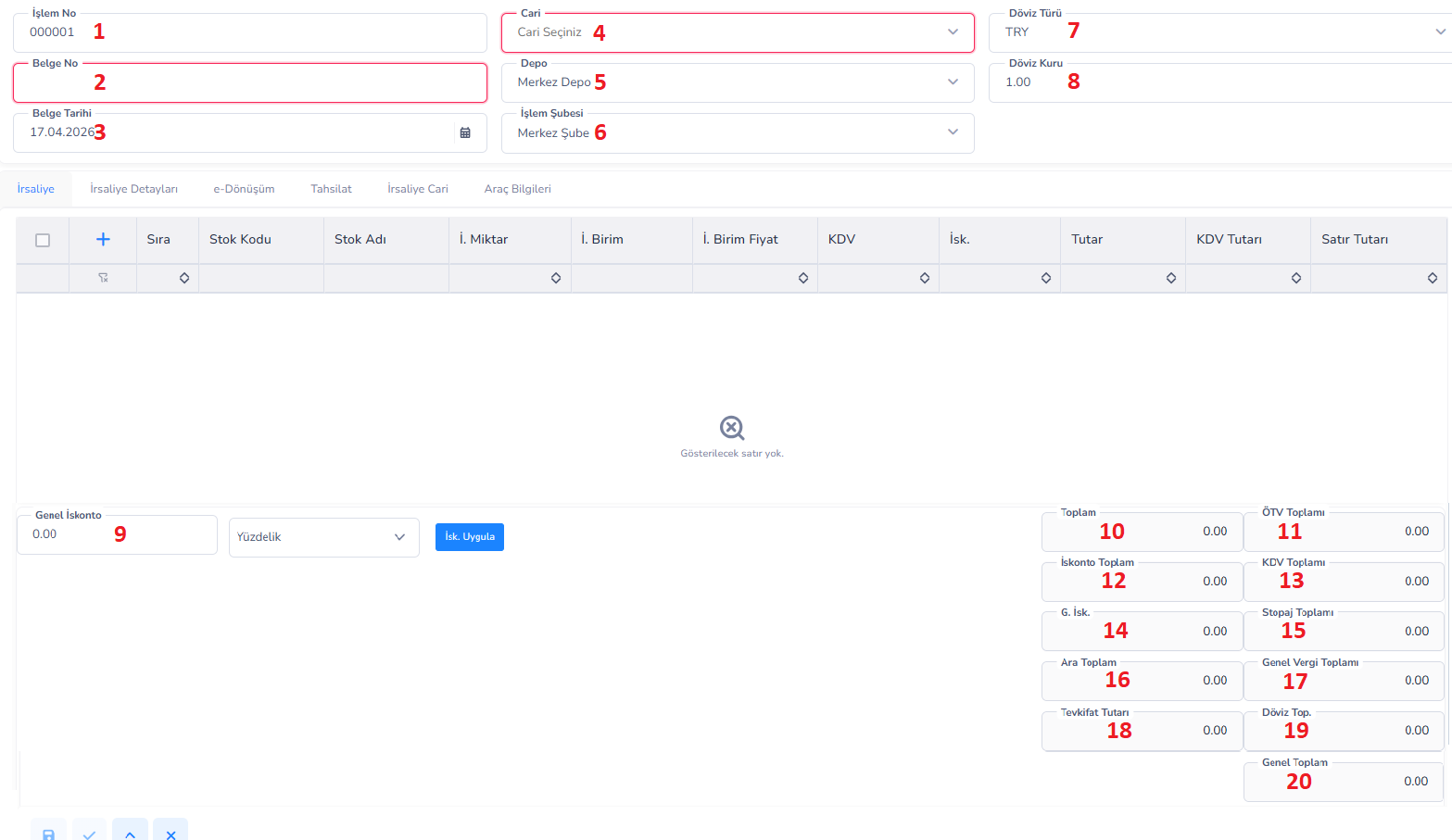
This screen is the area where the entry into the warehouse of products belonging to the supplier (consignment) is recorded. The products physically enter the stocks, but ownership does not pass to the company.
General Description
Consignment products are placed in the warehouse, but ownership remains with the supplier. As the products are sold, they become owned by the company and invoicing is done. Thanks to this structure, stock tracking and ownership tracking are carried out separately.
Header Information Fields:
1st Transaction Number: It is the transaction number automatically generated by the system
2.Document Number: It is the reference number of the delivery note
3.Document Date:The date the delivery note was issued
4.Current: Supplier company from which the consignment goods were purchased
5.Warehouse:The warehouse where the products will be entered
6.Transaction Branch:The branch to which the transaction is linked
7.Currency Type:Transaction currency
8.Exchange Rate:Exchange rate information for foreign currency transactions
Delivery Note Lines:
- Sequence: It is the line number
- Stock Code / Stock Name: Product information entering the warehouse
- I. Quantity:Quantity of items entered
- I. Unit:Unit of product measurement
- I. Unit Price:Unit price of the product (may be for informational purposes)
- VAT: Tax rate for the product
- Discount: Row-based discount
- Amount: Excludes VAT
- VAT Amount:Calculated VAT
- Line Amount: Total amount including VAT
Subfields (Totals):
9.General Discount Area:Discount to be applied to the entire document
10.Total: Total amount excluding VAT
11.SCT Total:Sum of special consumption tax, if any
12.Discount Total:Total discount amount applied
13.VAT Total:Calculated total VAT
14.G. Discount:General discount amount
15. Total Withholding Tax: Total withholding tax (tax deduction) applied
16th Subtotal: Total amount before discount and taxes
17. General Tax Total: Total of all tax items
18.Withholding Amount:Applied withholding (deduction) amount
19. Foreign Exchange Total: Total amount based on foreign currency
20.Grand Total:Final amount after all calculations
Features Specific to the Consignment Process:
- Products appear in stock, but ownership does not belong to the company
- When a sale is made, the stock is reduced and an invoice is created
- Reconciliation is made with the supplier at regular intervals
- In case of return, a return delivery note will be issued
General Purpose:
- Tracking consignment products separately from other stocks
- Ensuring the separation of stock and ownership
- Making correct invoicing after sales
- Ensuring transparent and controlled stock management with suppliers
DELIVERY DETAILS TAB
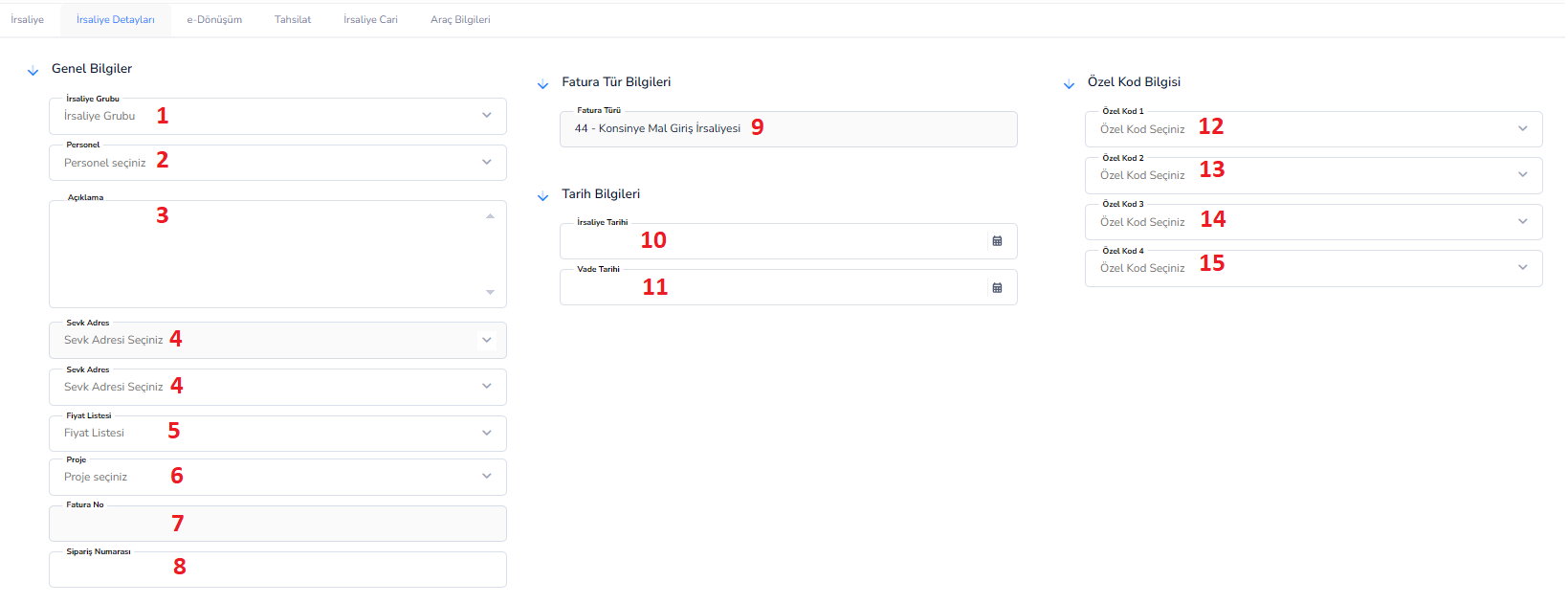
This tab is the area where additional information about the created delivery note is entered and the document is detailed. Management of the category, date, project and related information of the delivery note is done in this section.
General Information:
1st Delivery Note Group: It is the group or category information to which the delivery note belongs (e.g. Consignment, Normal Purchase)
2.Personnel:The personnel who performs the operation or is responsible is selected
3rd Explanation: This is the field where general notes about the delivery note are entered
4.Shipment Address: Address information where the products are sent or received
Additional Fields:
5.Price List: Area where the price list to be used in the transaction is selected
6.Project: Information about the project to which the delivery note is linked
7.Invoice Number:Invoice number attached to the delivery note (if any)
8.Order Number:The order number to which the delivery note is related
Invoice Type Information:
9.Invoice Type: Shows the type of the document in the system (44 – Consignment Goods Entry Delivery Note)
Date Information:
10.Delivery Note Date:The date the document was issued
11.Maturity Date:Specifies the payment or transaction maturity
Special Code Information:
8.Special Code 1:Used to classify the delivery note
9.Special Code 2: Additional category and filtering area
10.Special Code 3:Field used for reporting purposes
11.Special Code 4:Optional additional code field
Operation Logic:
- Additional information is entered in this tab when creating the delivery note
- Document type and date information are determined
- Delivery note is linked to projects and categories
- Connection with order and invoice can be established
- This information is used in process tracking and reporting
General Purpose:
- Recording the delivery note in detail and regularly
- Ensuring the connection between processes (Order → Delivery Note → Invoice)
- Collecting operational and financial information in one place
- Creating data infrastructure for reporting and analysis
E-CONVERSION TAB
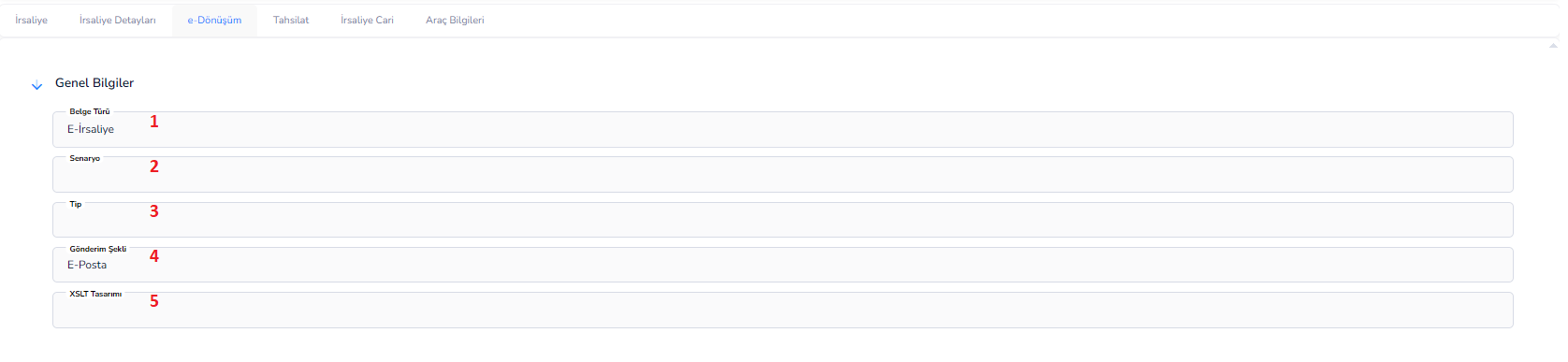
This tab is the area where the necessary settings are made to create and send the delivery note electronically. e-Delivery note processes are managed through this section.
General Information:
1.Document Type:Specifies the type of electronic document to be created (eg: E-Delivery Note)
Scenario 2: Determines the sending scenario of the e-Delivery Note (Basic Scenario, Commercial Scenario, etc.)
Type 3: It refers to the type of the document in the e-transformation system (standard, return, etc.)
4.Sending Method:Determines how the document will be delivered to the recipient (eg: e-mail, integrator)
5.XSLT Design: Determines the output design of the e-Delivery Note (PDF / visual template)
Operation Logic:
- After the delivery note is created, e-conversion information is entered
- Scenario and document type are determined
- Shipping method is selected
- The document is created and sent electronically
- The entire process is carried out in accordance with GIB standards
General Purpose:
- Moving the delivery note to electronic environment
- Producing documents in accordance with GIB standards
- Transmitting the document digitally to the other party
- Ensuring a paperless and fast transaction process
COLLECTION TAB

This tab is the area where financial transactions related to the delivery note (payment, check, promissory note, etc.) are recorded and tracked. A direct connection is established between the document and the payment process.
General Description:
The Collection tab allows the financial transactions of the delivery note to be recorded
Payment and collection transactions are associated with the document on this screen
Fields:
1st Row Number: Shows the order of collection records
2.Document Name: Indicates the document type of the collection transaction (eg: Collection Slip, Check, Promissory Note)
3.Document Number:This is the document number of the collection transaction
4.Code: It is the code or reference information for the transaction
5.Name: Explanation or description information of the transaction
Date 6: The date the collection took place
7.Withdrawal Type: Refers to the payment type (cash, bank, check, promissory note, etc.)
8.Withdrawal Installment:Whether the payment is in installments or installment information
Operation Logic:
- A payment or collection transaction is created regarding the delivery note
- These transactions are reflected in the collection tab
- Each payment record is associated with the document
- Financial movements are followed here
General Purpose:
- Associating delivery note with financial transactions
- Following up payments and collections
- Keeping current account movements under control
- Integrated management of finance and purchasing processes
Delivery Note CURRENT TAB
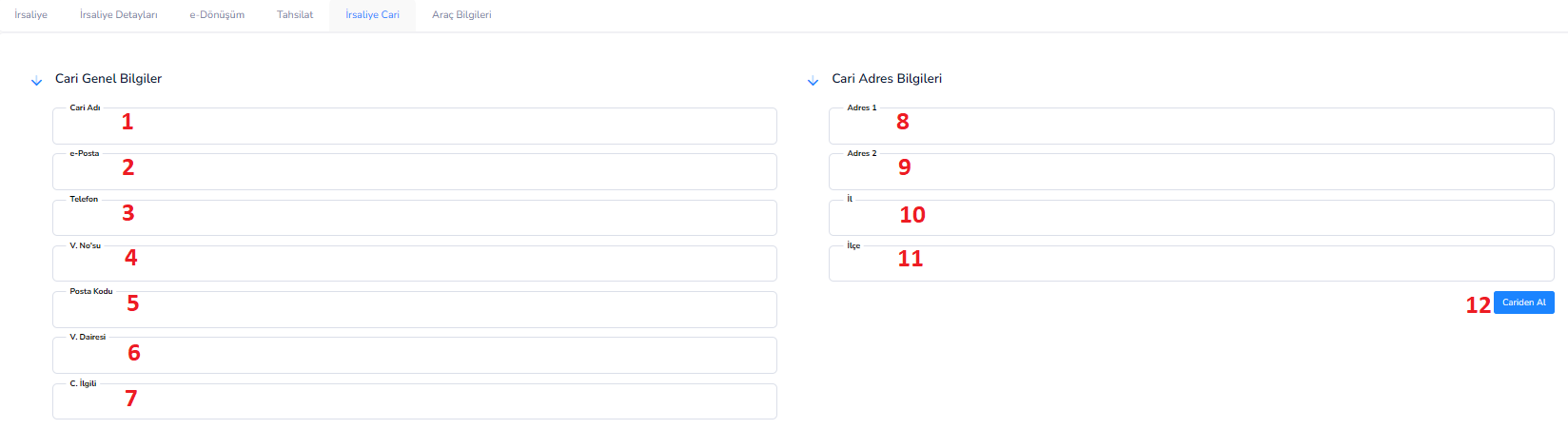
This tab is the area where the supplier (current) information of the delivery note is displayed and edited. Current contact and address information is detailed in this section.
Current General Information:
1.Client Name:The name of the supplier company to which the delivery note belongs
2.E-Mail:E-mail address of the current company
3rd Phone: Supplier contact number
4.V. No:Tax identification number of the company
5.Zip Code:Zip code information of the address
6.V. Office:The tax office to which the company is affiliated
7.C. Related:Authorized person information within the company
Current Address Information:
8.Address 1:Primary address information of the company
9.Address 2:Additional address details
10th Province:The province where the company is located
11th District:The district where the company is located
Transaction Button:
12.Retrieve from Client: Automatically brings information about the selected client card to this field
Operation Logic:
- Information can be retrieved automatically when current is selected
- Address and contact information are edited manually if necessary
- This information is used in delivery note documents
- Data accuracy and consistency are ensured
General Purpose:
- Collecting supplier information on a single screen
- Managing address and contact information correctly
- Using correct current information in delivery note documents
- Reducing manual data entry errors
VEHICLE INFORMATION TAB
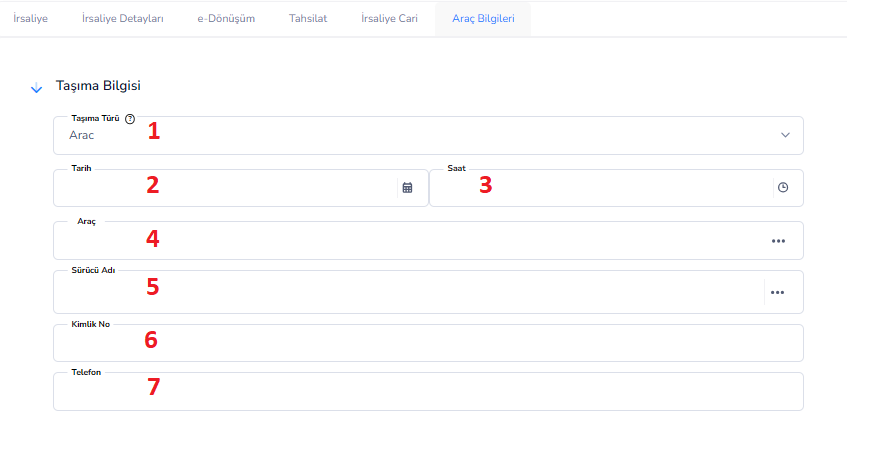
This tab is the area where vehicle, driver and shipment information for the transportation of the products subject to the delivery note are entered. The logistics process is tracked through this section.
Transportation Information:
1.Transportation Type:Indicates the method by which the products are transported (e.g. vehicle, cargo, transportation company)
2nd Date: It is the date when the transportation took place
3rd Time: Information about the time the shipment was made
Vehicle and Driver Information:
4.Vehicle: Vehicle information carrying out the transportation (license plate, vehicle type, etc.)
5. Driver Name: Name and surname of the person driving the vehicle
6.ID Number: Driver's ID information
7th Phone: Driver's contact number
Operation Logic:
- Transportation information is entered when shipping
- Vehicle and driver information is recorded
- This information is followed with the delivery note
- Used for inspection and control when necessary
General Purpose:
- Recording the shipment process
- Following transportation and logistics information
- Providing vehicle and driver based control
- Making operational processes more transparent
PURCHASE DISPATCH TYPES – GENERAL DESCRIPTION
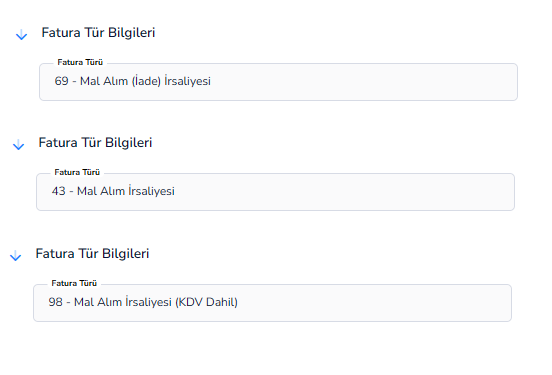
Different purchase note types (Goods Purchase, Goods Return, VAT Included, etc.) work with the same structure and transaction logic in the system. Screens, fields and process flow are identical.
The main difference between these types is that the document type (invoice type) changes. Depending on the selected invoice type, the transaction direction (entry / return) and calculation structure (VAT included / excluded) are determined.
In this way, the user can easily manage different purchasing scenarios on the same screen and the process proceeds in a standard structure.
Bu doküman yardımcı oldu mu?
Eksik veya geliştirilmesi gereken bir bölüm varsa destek ekibimizle paylaşabilirsiniz.