
Recipe and Production
ERP production management allows businesses to control production planning, operation tracking and resource management through a single system. The production recipe (BOM) within this structure is a critical component that defines the raw materials, quantities and production steps of a product. BYM ERP production and recipe modules work in integration with production planning, cost calculation and stock integration, helping businesses optimize their production processes, increase efficiency and create a sustainable production structure.
ERP production management allows businesses to control production planning, operation tracking and resource management through a single system. The production recipe (BOM) within this structure is a critical component that defines the raw materials, quantities and production steps of a product. BYM ERP production and recipe modules work in integration with production planning, cost calculation and stock integration, helping businesses optimize their production processes, increase efficiency and create a sustainable production structure.

Recipe Management General Buttons:
1. Add (+): Creates a new prescription record 2. Back:Returns to the previous page or record 3. Refresh:Updates and reloads data on the page 4. Delete:Deletes the selected prescription record 5. Edit:Allows changes to existing recipe 6. Copy: Creates a new record by copying the selected recipe 7. Update Cost: Updates the material and production costs in the recipe • Makes calculations according to current prices 8. Create Production Order: Creates a production order according to the defined recipe • Starts the production processPRESCRIPTION RECORD
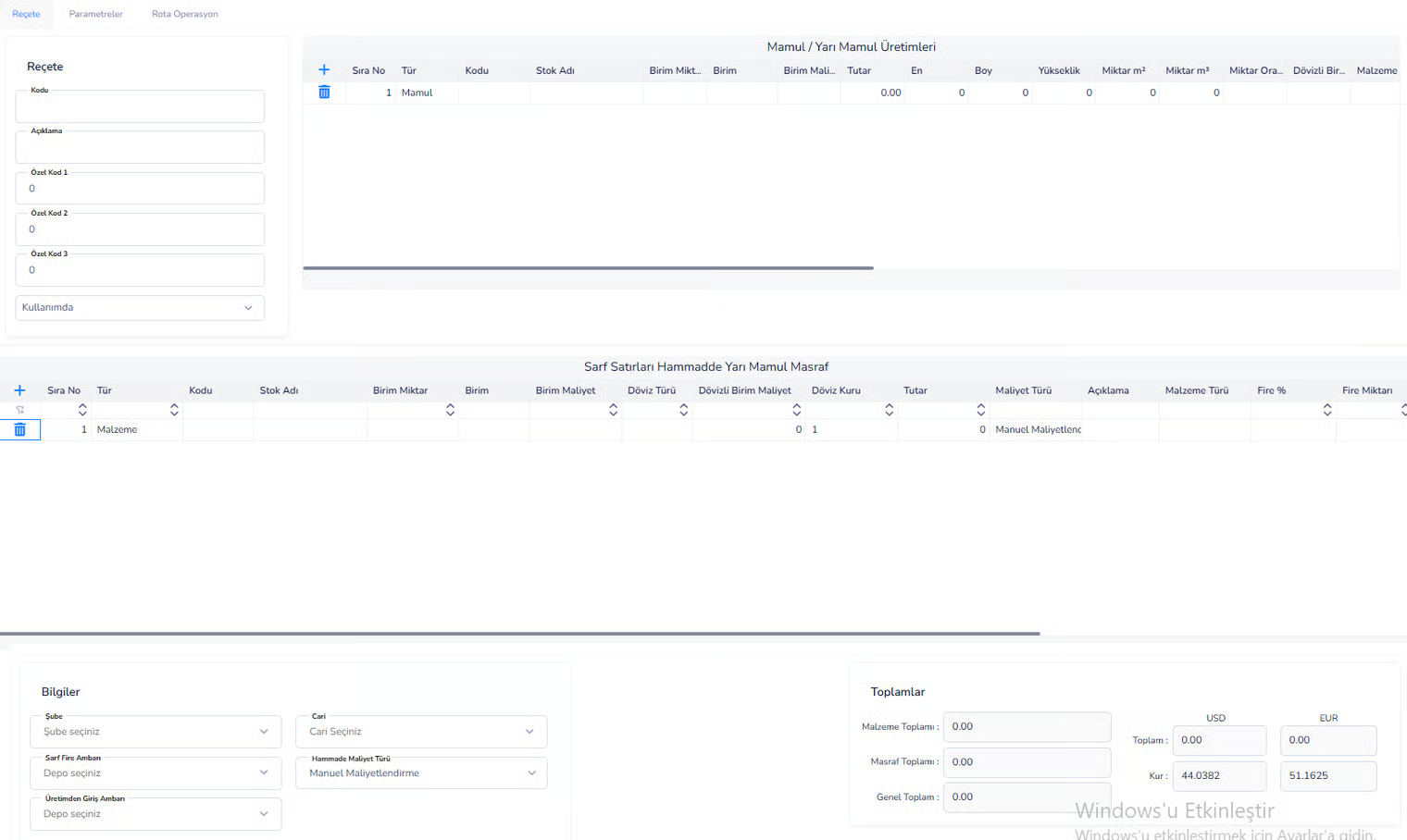
Prescription Information:
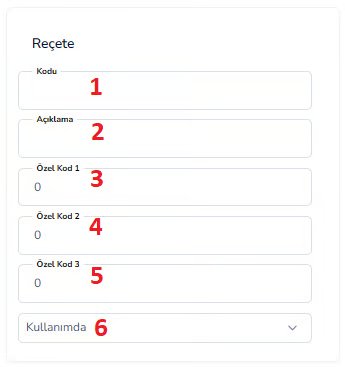
Finished / Semi-Finished Products Production Table:
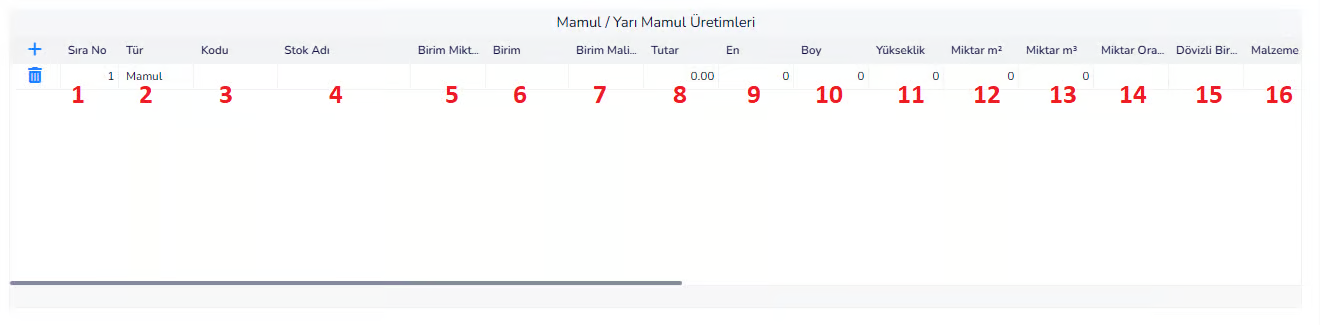

Consumable Lines (Raw Material):

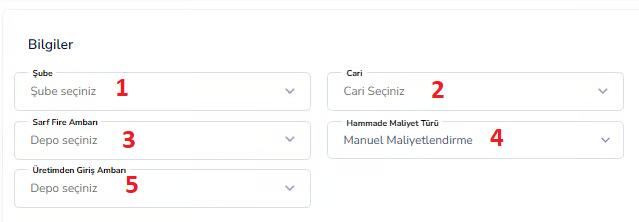
Information (Bottom Left):
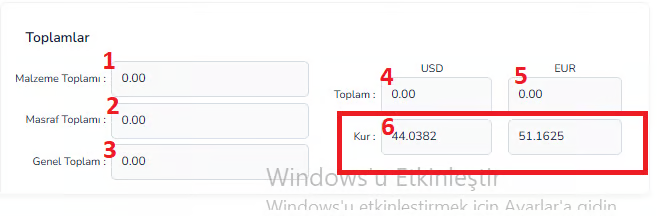
Totals:
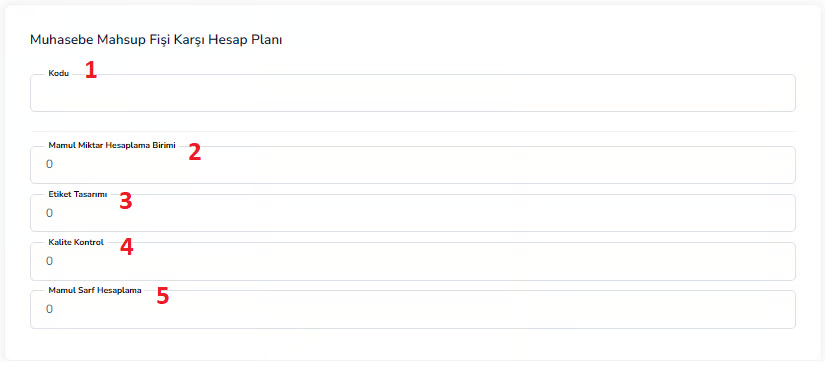
Accounting Integration (Parameters Tab)
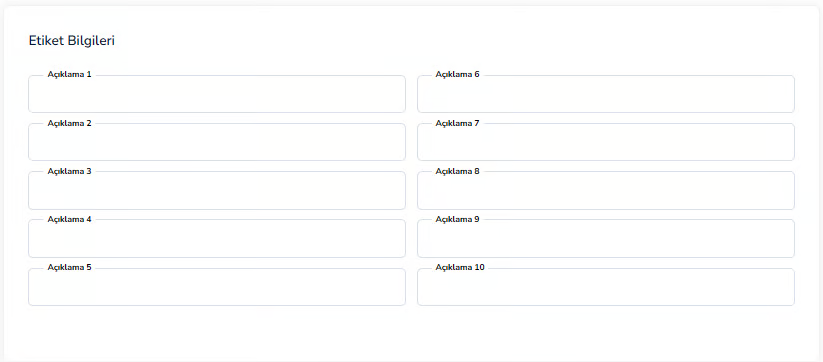
Tag Information (Parameters Tab)
Route / Operation (Route Operation Tab)

Top Area:
1. Route:The production route to be used
2. Add Operation:Adds new operation
3. Operation Delete:Deletes the selected operation 4. Move Up:Moves the ranking up 5. Move Down:Moves the ranking downDescription
The recipe management screen is the area that defines which raw materials, in what quantities and with which operation processes a product will be produced. On this screen, finished and semi-finished products are determined, materials used and costs are calculated, and the production process is detailed. Thus, production planning, cost calculation and stock management processes are carried out in an orderly and controlled manner through the system.
PLANNING AND PRODUCTION (PRODUCTION RECORDING)
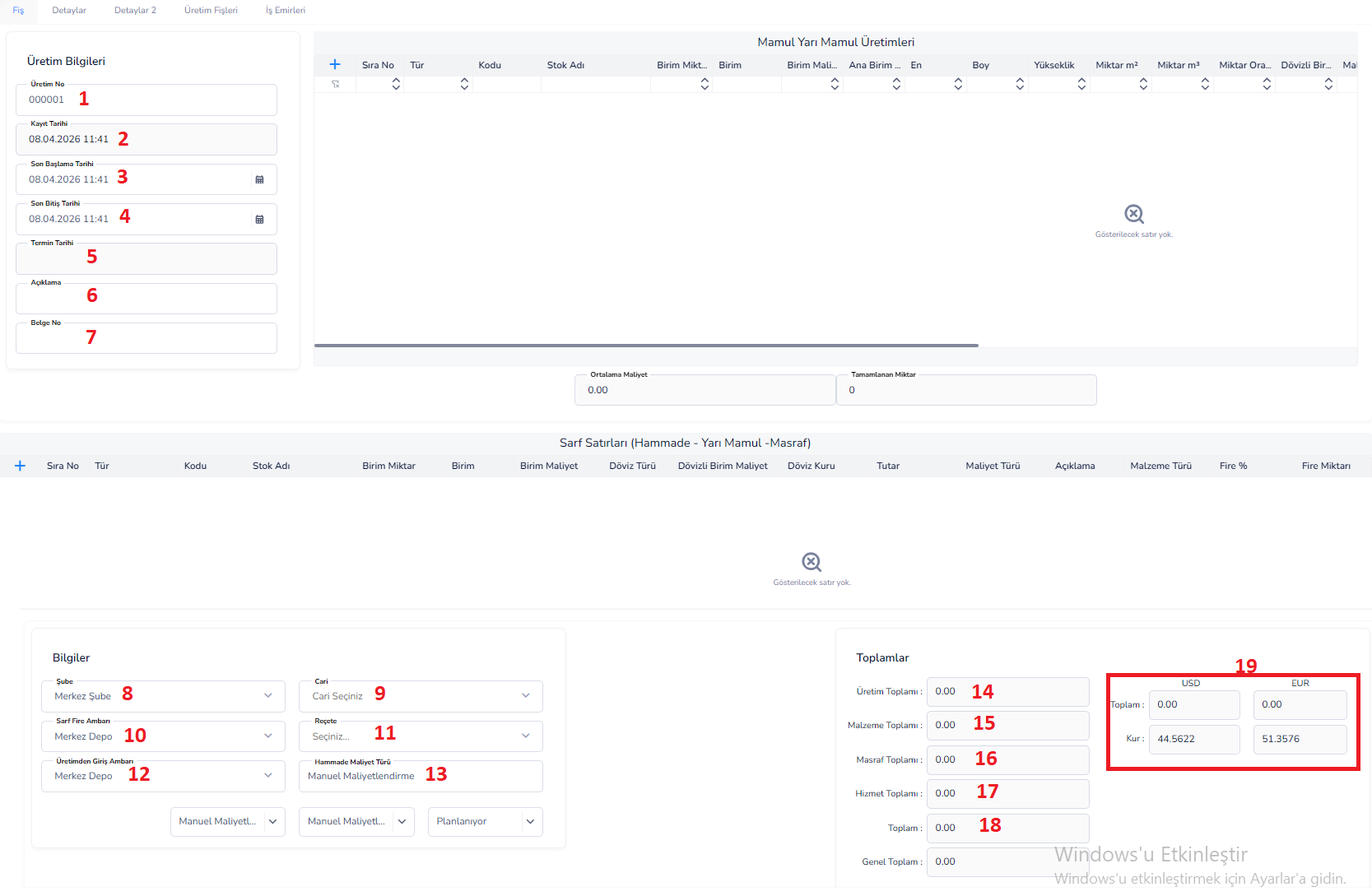
This screen is the main recording screen where production processes are started, planned and monitored. The entire process is managed from a single place by entering the products to be produced, raw materials used, costs and production information on this screen.
Production Information:
1st Production Number: It is the production number given automatically by the system
2.Record Date:Date and time when the production record was created
3.Latest Start Date:Date when production started
4.Finish Date:Date on which production was completed
5.Deadline:The planned date by which production should be completed
6.Description: Note or explanation area regarding production
7.Document No: Reference document number for production
Finished / Semi-Finished Products:
- Type:Type of production item (Finished Goods / Semi-Finished Goods)
- Code: Product stock code
- Stock Name: Name of the product
- Unit Quantity:Amount to be produced
- Unit: Unit of measurement (Piece, Kg etc.)
- Unit Cost:Unit cost of the product
- Width / Length / Height: Dimension information used in made-to-measure production
- Quantity m² / m³:Calculations based on area or volume
- Foreign Currency Unit:Cost information based on foreign currency
- Cost: It is the total cost information of the product to be produced
- Foreign Currency Cost:The equivalent of the cost in foreign currency
- Cost Distribution: Shows the distribution of the total cost by items
- Additional Cost:Additional costs added to production (labor, energy, etc.)
- Warehouse:Warehouse information where the produced product will be recorded
- Process Order:Determines the order of production steps
- Monitoring: Enables the production process to be followed (traceability)
- Additional Description: Additional note or explanation field about the production line
- Currency Type:Currency used (USD, EUR etc.)
- Exchange Rate: Exchange rate information used during the transaction
Consumable Lines (Raw Material - Semi-finished Goods - Expense):
- Type: Type of item used (Raw Material, Semi-Finished Product, Cost)
- Code:Stock code of the material
- Stock Name: Name of material used
- Unit Amount:Amount used
- Unit: Unit of measurement
- Unit Cost:Unit cost of the material
- Currency Type: Currency
- Foreign Currency Unit Cost:Foreign Currency based cost
- Exchange Rate:The exchange rate used
- Amount: Total cost
- Cost Type: Material / labor / expense type
- Description: Line-wise description
- Material Type:Use category
- Waste %: Waste rate occurring during production
- Amount of Waste:Amount of loss resulting from fire
Information Area:
8th Branch:The branch where production takes place
9.Current:Customer or company related to production
10.Consumables Fire Warehouse:The warehouse where waste products will be transferred
Recipe 11: Production recipe (BOM) to be used
12. Production Entry Warehouse:The warehouse where the produced product will enter
13.Raw Material Cost Type:Cost calculation method
Totals:
14. Total Production: Total cost of products produced
15.Total of Materials:Total cost of raw materials used
16. Total Expense: Total of additional expenses
17.Service Total:Service costs
18.Total:General total cost
19. Exchange Rate Information: Values calculated based on USD / EUR
Operation Logic:
- First of all, the product and quantity to be produced are determined
- The raw material list is automatically fetched by selecting the relevant recipe
- If necessary, consumption lines are edited manually
- Costs are calculated by the system
- Production is started and updated throughout the process
- When production is completed, stock and cost records are created
Thanks to this screen, the production process is controlled end-to-end, costs are monitored in detail and all production movements are systematically recorded.
Production Record – Details Tab
This tab is the area where accounting links, quality control settings and production-specific parameters of the production record are defined. Financial, operational and monitoring information of the production process is detailed here.
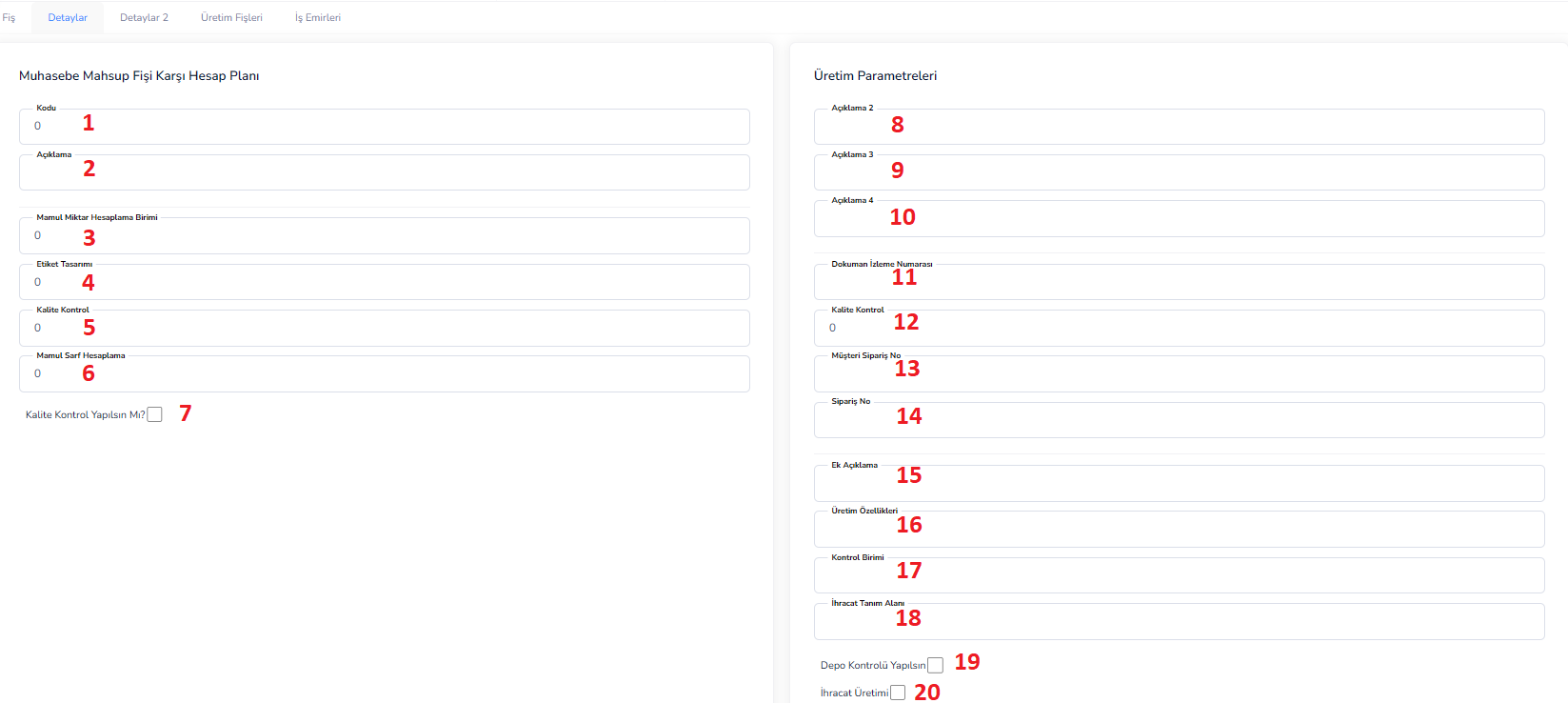
Accounting Offset Voucher Counter Chart of Accounts:
Code 1: It is the code information for the accounting chart of accounts
2.Explanation: This is the explanation field regarding the chart of accounts
3. Finished Goods Quantity Calculation Unit:Determines the unit in which the production quantity will be calculated
4.Label Design:Determines the label template to be used after production
5.Quality Control:It refers to the definition of quality control related to production
6. Product Consumption Calculation: It is the consumption calculation method to be used in product production
7.Should Quality Control Be Performed?:Determines the necessity of quality control in the production process
Production Parameters:
8.Description 2:This is the additional description field for the production
9.Annotation 3:This is the second annotation field
10.Annotation 4:This is the third annotation field
11.Document Tracking Number:It is the production document tracking number
12.Quality Control:Quality control information is entered in this field
13.Customer Order Number:This is the customer order number to which the production is based
14.Order Number: Internal order or production order number
15. Additional Explanation: This is the detailed explanation area about production
16.Production Features:Technical or operational features specific to production
17.Control Unit:Information about the unit that will perform quality control
18.Export Definition Area:Definition area used if the product is intended for export
19.Whether Warehouse Control Should Be Performed:Determines whether warehouse control will be performed in production
20.Export Production:Indicates whether the production is within the scope of export
Production Record – Production Receipts Tab
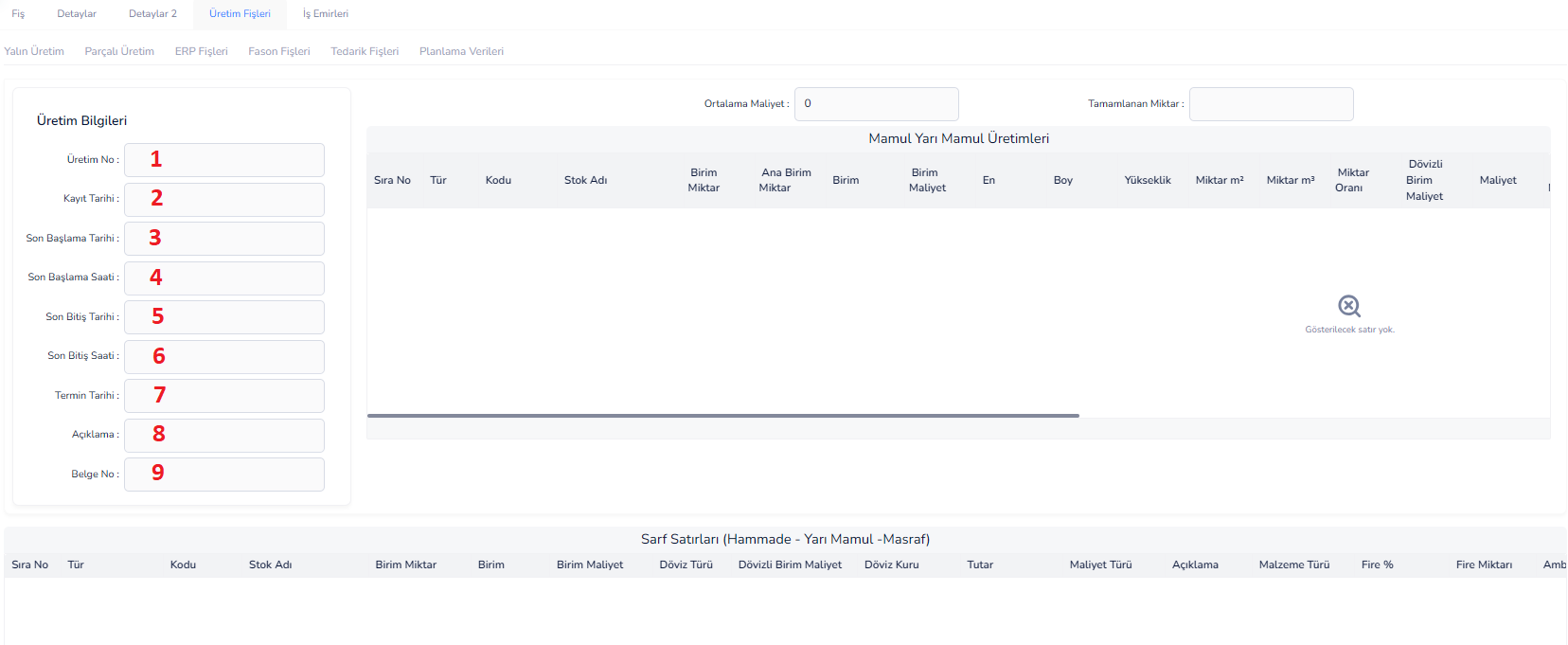
This tab is the area where the receipts (actual production records) of the production process are entered and tracked in detail. Production quantities, materials used and cost information are managed on this screen.
Production Information:
1.Production Number: It is the unique number of the production record
2.Record Date:The date the production voucher was created
3.Latest Start Date:Date when production started
4.Last Start Time:Start time of production
5.Completion Date:Date on which production was completed
6.Finish Time:End time of production
7.Deadline:Planned end date of production
8.Description: Note area regarding production
9.Document No: Reference document number for production
Finished / Semi-Finished Products:
- Sequence Number:Sequence number of the production line
- Type:Type of production item (Finished Goods / Semi-Finished Goods)
- Code: Product stock code
- Stock Name: Name of the product
- Unit Quantity:Amount produced
- Main Unit Quantity: Quantity calculated based on the main unit
- Unit: Unit of measurement
- Unit Cost:Unit cost of the product
- Width: Width of the product
- Length: Product length
- Height:Height of the product
- Quantity m²: Quantity by area
- Quantity m³:Quantity based on volume
- Quantity Rate:Production rate
- Unit Cost in Foreign Currency:Unit Cost in Foreign Currency
- Cost: Total cost
- Cost in Foreign Currency:Foreign currency equivalent of the total cost
- Cost Allocation Rate: Percentage of distribution of cost
- Additional Cost: Additional costs added to production
- Warehouse:The warehouse where the produced product will be transferred
- Process Sequence:Sequence of production steps
- Monitoring:Tracking information of the production process
- Additional Descriptions:Detailed explanations of the production line
- Currency Type:Currency used
- Total Currency:Total amount based on foreign currency
- Exchange Rate:The exchange rate used
Consumable Lines (Raw Material - Semi-finished Goods - Expense)
- Sequence Number:Sequence number of the consumable line
- Type: Type of pen used
- Code:Material stock code
- Stock Name: Material name
- Unit Amount:Amount used
- Unit: Unit of measurement
- Unit Cost:Material unit cost
- Currency Type: Currency
- Foreign Currency Unit Cost:Foreign Currency based cost
- Exchange Rate:Exchange rate information
- Amount: Total cost
- Cost Type: Material / labor / expense
- Description: Line description
- Material Type:Use category
- Waste %: Waste rate
- Amount of Waste:Amount of Waste
- Warehouse:The warehouse where the consumable material comes out
Process Logic
- Production records are entered via the production voucher
- Finished and semi-finished product production lines are created
- The raw materials used are added to the consumption lines
- The system calculates costs automatically or manually
- When production is completed, stock and cost records are created
This tab shows the actual (actual) equivalent of planned production and provides detailed control of production processes.
Production Record – Work Orders Tab

This tab is the area where the operations (work steps) to be performed during the production process are planned and monitored. Production process; It is managed here based on station, machine and operator.
Top Area (Action Buttons and Settings):
Route 1: This is the area where the operation route to be used in production is selected
2.Add Operation: Used to add a new operation line
3.Operation Delete: Deletes the selected operation line
4.Move Up: Moves the operation order up
5.Move Down: Moves the operation order down
6.Gantt:Shows the time plan of operations graphically
7.KBP Open:Opens the capacity-based planning screen
8.KBP Close: Closes the capacity planning screen
9.Status: Determines the current status of the work order (eg: Pending)
Work Order Lines:
- Sequence Number: Shows the order of the operation
- Operation: Name of the job or process to be done
- Start Date:Planned start date of the operation
- End Date:Planned end date of the operation
- Duration: Total duration of the operation
- Station:The production station where the process will be performed
- Machines: Information about the machine to be used
- Operators: Personnel who will perform the operation
- Station Status: Current status of the station
- Operation: Operations that can be performed on the operation
- Description:Additional information about the operation
Operation Logic:
- First, the appropriate route for production is selected
- Operations are added automatically or manually when the route is selected
- Station, machine and operator are assigned for each operation
- Operation durations and dates are determined
- Work orders proceed sequentially
- The process can be followed visually via Gantt
- The production process is managed through these operations
Thanks to this tab, production steps are planned in detail, resources are assigned correctly and the process is kept under control from start to finish.
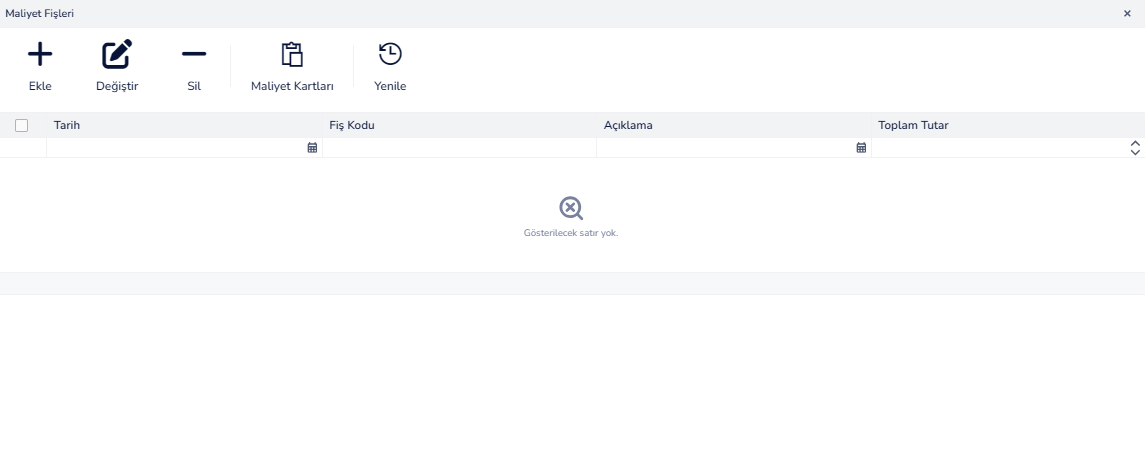
COST DISTRIBUTION VOUCHES

This screen is the area where vouchers used to distribute the costs incurred in the production processes to the relevant items are created and managed. Production costs are controlled on this screen and distributed and accounted correctly.
Top Area (Action Buttons):
1.Add: Used to create a new cost distribution voucher
2.Edit: Allows editing on the selected voucher
3.Delete: Deletes the selected cost distribution voucher
4.Costing:Starts the cost calculation process
5.Cost Vouchers:Displays the created cost vouchers
6.Cost Cards: Provides access to cost cards
7.Cost Groups:Used to manage cost groups
8.Refresh: Updates the list
9.Update ERP Production Slips:Ensures synchronization of costs by updating the production slips on the ERP side
List Area:
- Date:The date the cost distribution voucher was created
- Voucher Code: Unique reference number of the voucher
- Description: Explanation or note about the receipt
- Total Amount:Total cost amount of the voucher
Operation Logic:
- A new cost distribution voucher is created
- Cost data from production is taken into the system
- Costs are allocated to relevant items
- Edit if necessary
- Costing process is run
- The results are reflected in cost cards and production records
Thanks to this screen, production costs are distributed in a detailed and controlled manner, accuracy of cost calculations is ensured and financial processes are managed more accurately.
COST DISTRIBUTION RECEIPTS SCREEN
Cost Distribution Slip/Add Editing Screen:
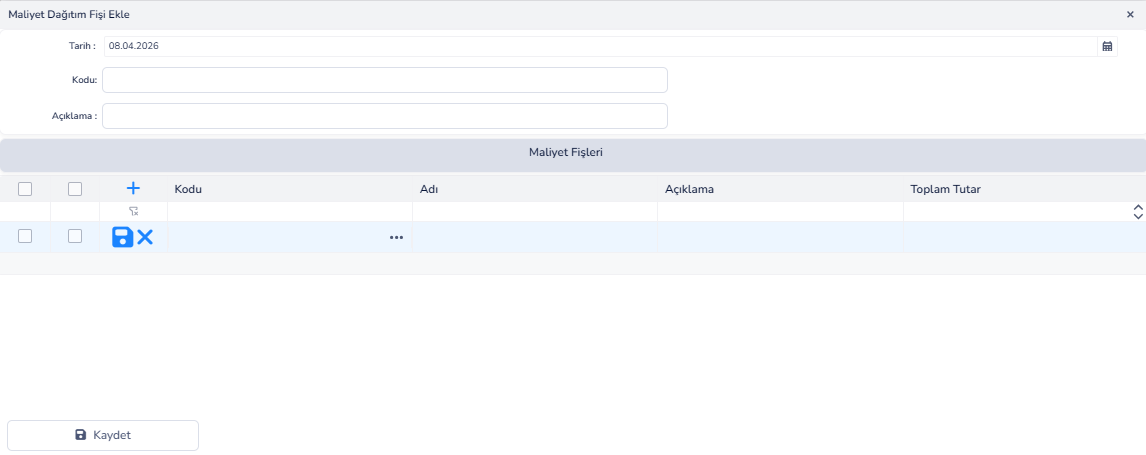
Update Cost Distribution Voucher Screen:
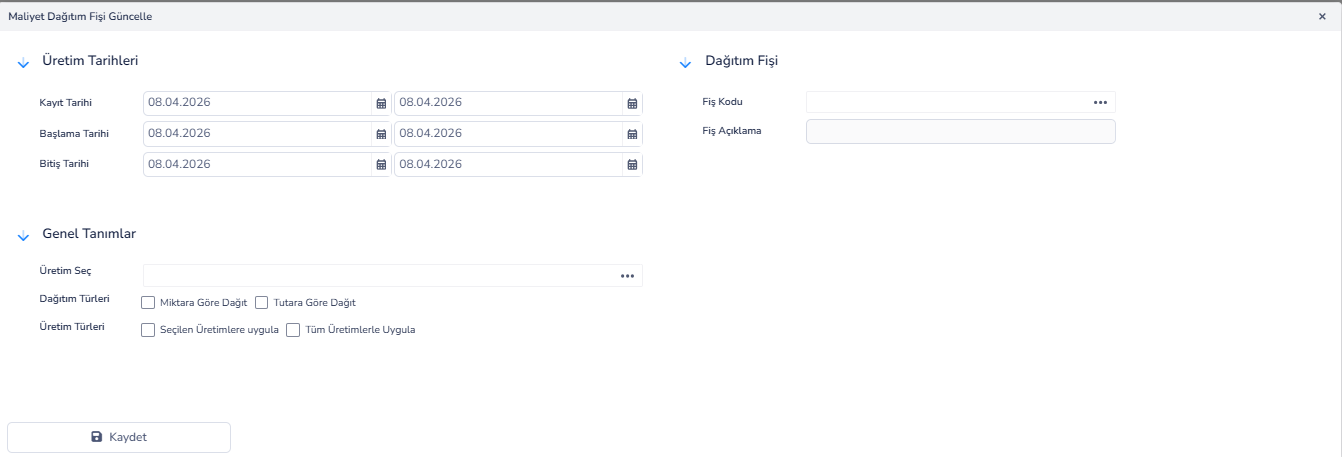
This screen opens when the "Costing" button on the cost distribution slips screen is pressed. It is used to determine the criteria according to which the costs of production will be distributed and to perform the costing process.
Production Dates:
1.Record Date:Determines the date range of production records to be costed
2.Start Date: Filters according to the start date of production
3.End Date: Filters according to the end date of production
Distribution Receipt:
4.Voucher Code:This is the code of the cost distribution voucher to be created
5.Receipt Description:This is the description or note field about the receipt
General Definitions:
6.Select Production: This is the field where the production record to be costed is selected
7.Distribution Types:Determines how the cost will be distributed
8.Production Types:Determines which productions the distribution will be applied to
Operation Logic:
- Firstly, the date range is determined
- Productions to be costed are selected
- The distribution method (amount or amount) is determined
- The production scope to be applied is selected
- Receipt information has been entered
- The process is completed with the Save button
- The system automatically distributes costs according to selected criteria
Thanks to this screen, production costs can be distributed in a controlled and flexible way, and costing operations can be easily carried out according to different scenarios.
Bu doküman yardımcı oldu mu?
Eksik veya geliştirilmesi gereken bir bölüm varsa destek ekibimizle paylaşabilirsiniz.