
Satış Raporları
Bu ekran, sistemde kayıtlı fatura ve irsaliye işlemlerinin raporlanması ve analiz edilmesi için kullanılır. Belirli filtreler ile veriler daraltılarak detaylı inceleme yapılabilir. Satış ve alış süreçlerinin kontrolü, raporlama ve denetim açısından önemli bir ekranıdır.
FATURA / İRSALİYE RAPORLARI EKRANI
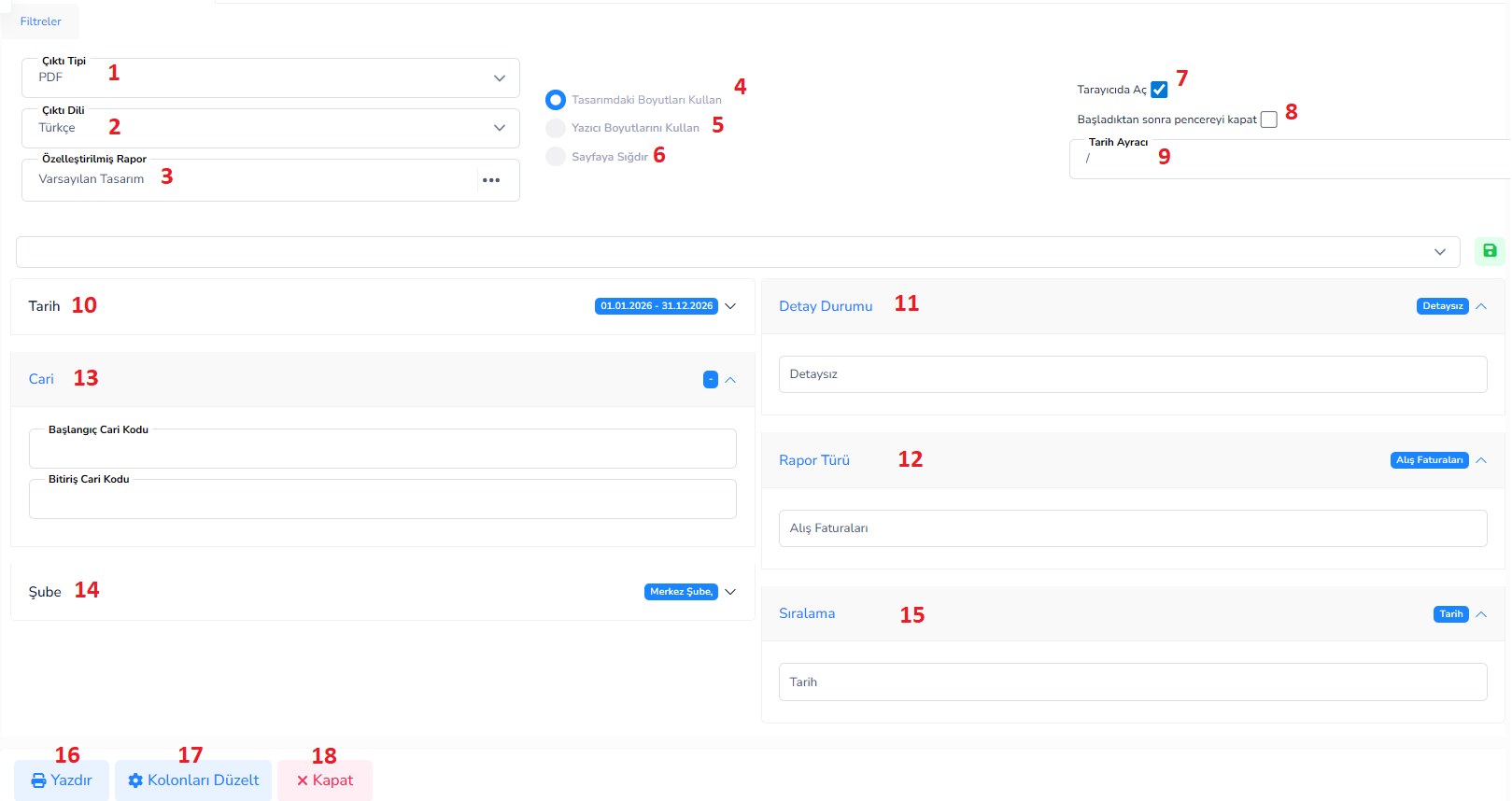
Bu ekran, sistemde kayıtlı fatura ve irsaliye işlemlerinin raporlanması ve analiz edilmesi için kullanılır. Belirli filtreler ile veriler daraltılarak detaylı inceleme yapılabilir. Satış ve alış süreçlerinin kontrolü, raporlama ve denetim açısından önemli bir ekranıdır.
Üst Filtre Alanı:
1.Çıktı Tipi: Raporun hangi formatta alınacağını belirler. (PDF, Excel vb.)
2.Çıktı Dili: Raporun hangi dilde oluşturulacağını belirler.
3.Özelleştirilmiş Rapor: Kullanılacak rapor tasarım şablonu seçilir.
Yazdırma Ayarları:
4.Tasarımıdaki Boyutları Kullan: Raporu tasarımda belirlenen ölçüler ile oluşturur.
5.Yazıcı Boyutlarını Kullan: Yazıcıya uygun otomatik boyutlandırma yapar.
6.Sayfaya Sığdır: Raporu sayfaya sığacak şekilde ölçekler.
7.Tarayıcıda Aç: Raporu yeni sekmede açar.
8.Başladıktan sonra pencereyi kapat: Rapor oluşturulduktan sonra ekranı otomatik kapatır.
9.Tarih Ayracı: Tarih formatında kullanılacak ayırıcıyı belirler.(/ – gibi)
10.Tarih: Raporun hangi tarih aralığını kapsayacağını belirler. (Başlangıç – Bitiş)
11.Detay Durumu:
-
- Detaysız: Sadece özet bilgi gösterir.
- Detaylı: Satır bazlı tüm detayları gösterir.
- Sadece Stoklar: Sadece ürün (stok) bazlı kayıtları listeler.
- Sadece Stoklar Tarih Bazlı: Stok hareketlerini tarih sırasına göre detaylı gösterir.
12.Rapor Türü:
-
- Alış Faturaları: Tedarikçilerden alınan faturaları listeler.
- Alış İrsaliyeleri: Alışa ait sevk belgelerini gösterir.
- Satış Faturaları: Müşterilere kesilen faturaları listeler.
- Satış İrsaliyeleri: Müşterilere yapılan sevkiyat belgelerini gösterir.
- Faturalandırılmamış İrsaliyeler: Henüz faturaya dönüşmemiş irsaliyeleri listeler.
- Faturalandırılmış İrsaliyeler: Faturaya dönüşmüş irsaliyeleri gösterir.
- Müstahsil / Gider Makbuzu: Özel belge türlerine ait kayıtları listeler.
- KDV / Stok Grup Raporları: Vergi ve ürün bazlı analiz raporları sunar.
13.Cari (Başlangıç – Bitiş): Belirli müşteri veya tedarikçi aralığına göre filtreleme yapılır.
14.Şube: Şube bazlı filtreleme yapılır.
15.Sıralama:
-
- Tarih: Kayıtlar işlem tarihine göre sıralanır. (En yaygın kullanılan sıralamadır)
- Belge No: Kayıtlar belge numarasına göre sıralanır.
- Cari Kod: Kayıtlar müşteri/tedarikçi koduna göre sıralanır.
- Tarih – Belge No – Cari Kod: Önce tarihe, sonra belge numarasına, en son cari koda göre sıralama yapılır.
- Tarih – Cari Kod – Belge No: Önce tarihe, sonra cari koda, ardından belge numarasına göre sıralanır.
- Belge No – Tarih – Cari Kod: Önce belge numarasına, sonra tarihe, ardından cari koda göre sıralanır.
- Belge No – Cari Kod – Tarih: Önce belge numarası, sonra cari kod, en son tarih baz alınır.
- Cari Kod – Tarih – Belge No: Önce müşteri/tedarikçi, sonra tarih, ardından belge numarası sıralanır.
- Cari Kod – Belge No – Tarih: Önce cari kod, sonra belge numarası, en son tarih sıralaması yapılır.
Alt Butonlar:
16.Yazdır: Seçilen filtrelere göre rapor oluşturur.
17.Kolonları Düzelt: Rapor kolonlarının görünümü düzenlenir.
18.Kapat: Ekranı kapatır.
Bu doküman yardımcı oldu mu?
Eksik veya geliştirilmesi gereken bir bölüm varsa destek ekibimizle paylaşabilirsiniz.