
Depo Tanımlama / Depo İşlemleri
Mal Girişi ekranında yer alan Özel Kod alanları , yapılan giriş işlemlerinin işletmeye özel kriterlere göre sınıflandırılmasını sağlar.
DEPO KARTI TANIMLAMA EKRANI
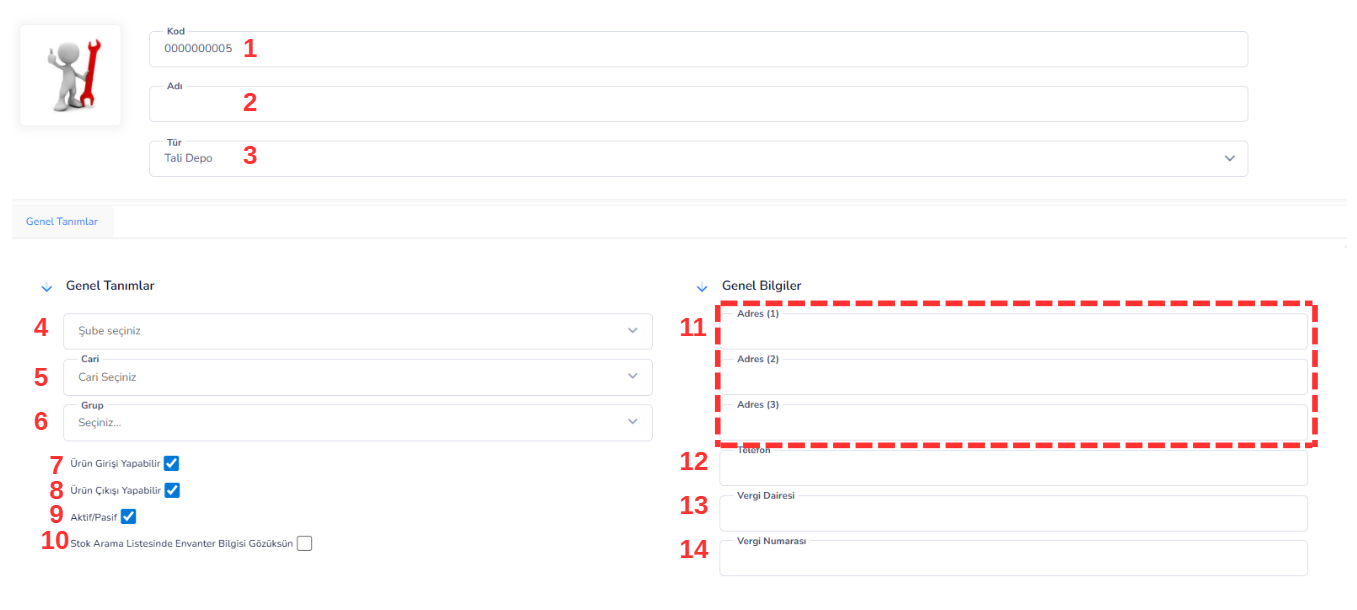
Üst Alan Bilgileri:
1. Kod: Depo kartına ait benzersiz koddur. Sistem içerisinde depo bazlı işlemlerde referans olarak kullanılır. 2. Adı: Deponun adının girildiği alandır. (Örnek: Merkez Depo, Şube Depo, Sevkiyat Deposu vb.) 3. Tür: Depo tipini belirler. Örnek: Fiziksel Depo, Sanal Depo, Tali Depo Bu alan, depo kullanım amacına göre sistem davranışlarını etkileyebilir.Genel Tanımlar Alanı:
4. Şube: Deponun bağlı olduğu şubeyi belirtir. Çok şubeli yapılarda depo-şube ilişkisini kurar. 5. Cari: Depo ile ilişkili cari hesap bilgisidir. (Örneğin fason depo, müşteri deposu vb.) 6. Grup: Depoların kategorize edilmesini sağlar. (Ana depo, sevkiyat deposu, üretim deposu vb.)İşlem Yetkileri:
7. Ürün Girişi Yapılabilir: İşaretlendiğinde bu depoya stok girişi yapılmasına izin verilir. 8. Ürün Çıkışı Yapılabilir: İşaretlendiğinde bu depodan stok çıkışı yapılmasına izin verilir. 9. Aktif/Pasif: Deponun kullanım durumunu belirler.-
- Aktif: Kullanımda
-
- Pasif: İşlemlerde kullanılamaz
Genel Bilgiler Alanı:
11. Adres (1-3): Deponun açık adres bilgilerinin girildiği alanlardır. 12. Telefon: Depoya ait iletişim numarasıdır. 13. Vergi Dairesi: Depoya ait vergi dairesi bilgisidir (gerektiğinde kullanılır). 14. Vergi Numarası: Depoya ait vergi numarasıdır. Genel Açıklama Depo Kartı Tanımlama ekranı, stok yönetiminin temel yapı taşlarından biridir. Bu ekran üzerinden tanımlanan depolar sayesinde stoklar lokasyon bazlı takip edilir, giriş-çıkış işlemleri kontrol altına alınır ve envanter yönetimi daha düzenli hale getirilir. Özellikle çok şubeli ve çok depolu işletmelerde doğru yapılandırma büyük önem taşır.DEPO TRANSFER FİŞİ EKRANI
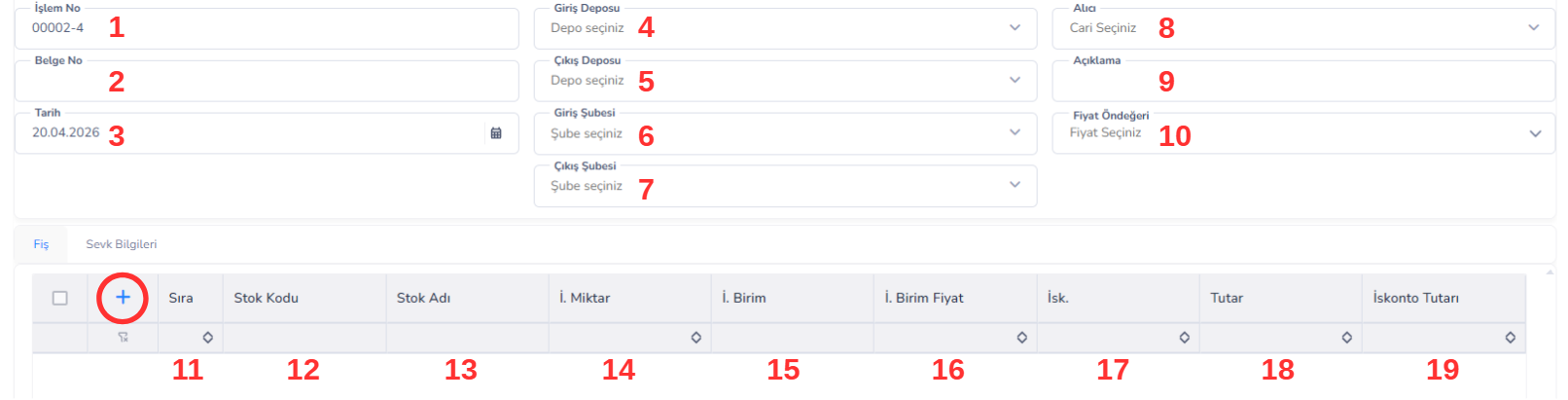
Üst Alan Bilgileri:
1. İşlem No: Sistem tarafından otomatik oluşturulan işlem numarasıdır. Transfer işleminin benzersiz kimliğidir. 2. Belge No: Transfer işlemine ait manuel veya sistem tarafından verilen belge numarasıdır. 3. Tarih: Transfer işleminin gerçekleştirildiği tarihi ifade eder.
Depo ve Şube Bilgileri:
4. Giriş Deposu: Ürünlerin aktarılacağı hedef depoyu belirtir. 5. Çıkış Deposu: Ürünlerin çıkış yapacağı kaynak depoyu belirtir. 6. Giriş Şubesi: Transferin yapılacağı hedef şubeyi ifade eder. 7. Çıkış Şubesi: Transferin gerçekleştiği kaynak şubeyi ifade eder.Ek Bilgiler:
8. Alıcı: Transfer işlemi belirli bir cari veya sorumlu kişi ile ilişkilendirilecekse kullanılır. 9. Açıklama: Transfer işlemine ait ek bilgi veya notların girildiği alandır. 10. Fiyat Öndeğeri: Transfer sırasında kullanılacak fiyat tipini belirler (alış fiyatı, satış fiyatı vb.). Maliyet hesaplamalarında etkili olabilir.Fiş Detay Alanı (Satır Bilgileri):
11. Sıra: Eklenen ürünlerin işlem sırasını belirtir. 12. Stok Kodu: Transfer edilecek ürünün kodudur. 13. Stok Adı: Ürünün adını gösterir. 14. Miktar: Transfer edilecek ürün miktarını ifade eder. 15. Birim: Ürünün işlem göreceği birimi belirtir (adet, paket vb.). 16. Birim Fiyat: Ürünün transfer sırasında kullanılan birim fiyatıdır. 17. İskonto: Ürüne uygulanacak indirim oranıdır (varsa). 18. Tutar: Toplam tutarı ifade eder (miktar × birim fiyat). 19. İskonto Tutarı: Uygulanan iskonto sonucu oluşan indirim tutarıdır.Sevk Bilgileri Sekmesi:
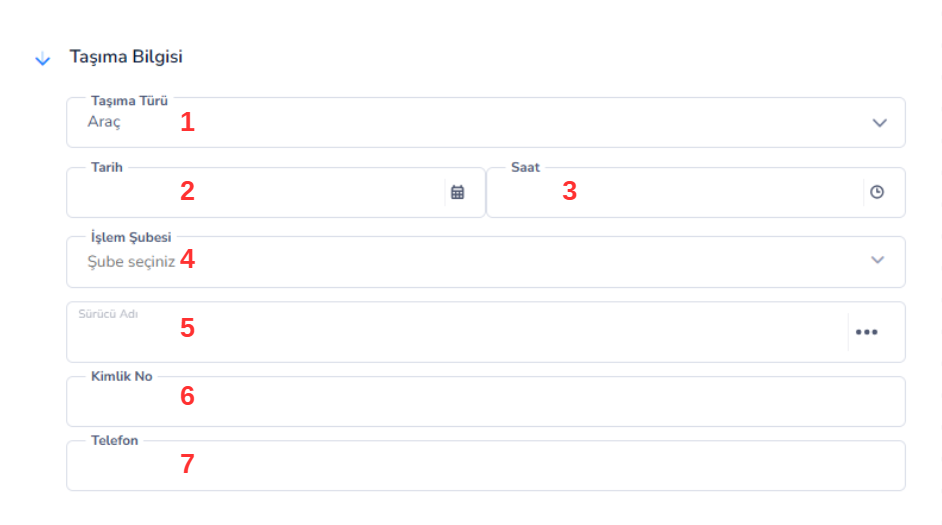
Taşıma Bilgisi Alanı:
1. Taşıma Türü: Transfer işleminin hangi yöntemle gerçekleştirileceğini belirtir. Örnek:-
- Araç
-
- Kargo
-
- Nakliye Firması
-
- Lojistik süreçlerin sınıflandırılmasını sağlar.
STOK GİRİŞ İŞLEMLERİ
Stok Giriş İşlemleri, işletmeye ait ürünlerin depolara girişinin kaydedildiği işlemleri ifade eder. Bu işlemler sayesinde stok miktarları güncellenir, maliyet hesaplamaları yapılır ve envanter takibi sağlıklı bir şekilde yürütülür. Sistem içerisinde stok girişleri, işlemin türüne göre farklı kategorilere ayrılmıştır. Bu ayrım, hem muhasebe hem de operasyonel süreçlerin doğru yönetilmesi açısından büyük önem taşır.Stok Giriş Türleri:
1. Mal Giriş (Alış Girişi):
Tedarikçilerden satın alınan ürünlerin depoya girişini ifade eder.- En yaygın stok giriş türüdür
- Fatura veya irsaliye ile ilişkilidir
- Ürünün maliyetini belirler
- Muhasebede alış işlemi olarak kayıt altına alınır
2. Sair Giriş:
Standart alış işlemleri dışında kalan stok girişlerini ifade eder.- Bağış, promosyon, düzeltme gibi durumlar için kullanılır
- Faturasız girişlerde tercih edilir
- Esnek kullanım sağlar
3. Sayım Girişi:
Stok sayımı sonucunda tespit edilen fazla miktarların sisteme eklenmesini sağlar.- Envanter sayımı sonrası kullanılır
- Sistem ile fiziksel stok arasındaki farkı düzeltir
- Stok doğruluğunu sağlar
4. Devir Girişi:
Geçmiş dönemlerden gelen stokların sisteme başlangıç olarak girilmesini sağlar.- Sistem ilk kurulurken kullanılır
- Dönem açılış işlemlerinde kullanılır
- Önceki stokların devredilmesini sağlar
5. Üretimden Giriş:
Üretim süreci sonucunda ortaya çıkan ürünlerin stoğa alınmasını sağlar.- Üretim modülü ile entegre çalışır
- Mamul veya yarı mamul girişlerinde kullanılır
- Maliyet hesaplamaları ile bağlantılıdır
MAL GİRİŞİ
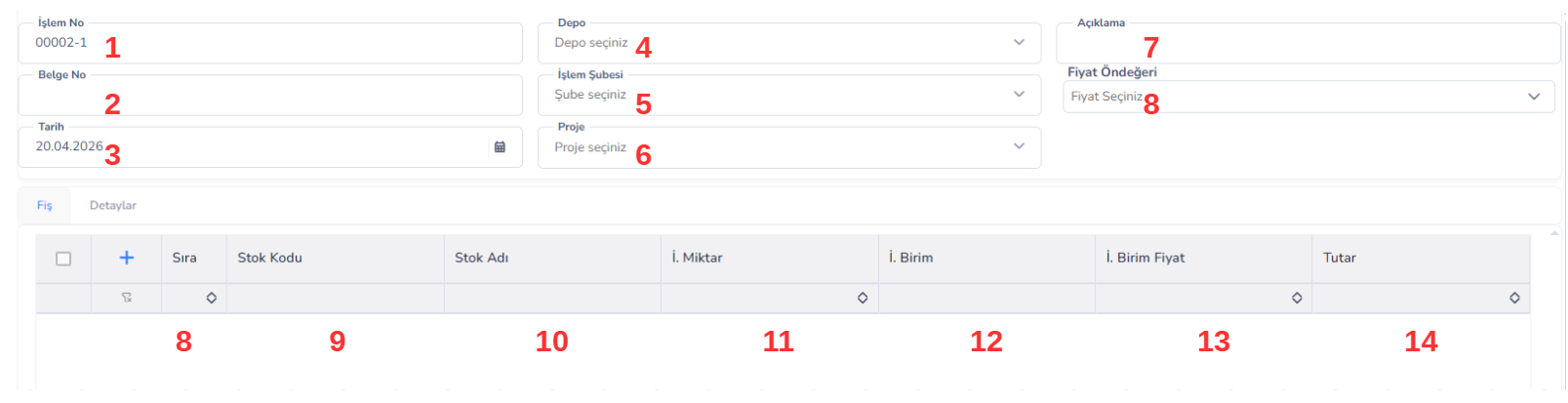
Mal Girişi Ekranı:
Mal Girişi ekranı, tedarikçilerden satın alınan ürünlerin depoya giriş işlemlerinin gerçekleştirildiği alandır. Bu ekran üzerinden yapılan işlemler sayesinde stok miktarları artırılır, ürün maliyetleri belirlenir ve satın alma süreçleri sistem üzerinde kayıt altına alınır.Üst Alan Bilgileri:
1. İşlem No: Sistem tarafından otomatik oluşturulan işlem numarasıdır. Her mal giriş işlemi için benzersizdir. 2. Belge No: İlgili alış işlemine ait fatura veya irsaliye numarasıdır. Dış evrak takibi için kullanılır. 3. Tarih: Mal giriş işleminin gerçekleştirildiği tarihi ifade eder.Depo ve Organizasyon Bilgileri:
4. Depo: Ürünlerin giriş yapacağı depoyu belirtir. Stok artışı bu depo üzerinde gerçekleşir. 5. İşlem Şubesi: Mal giriş işleminin hangi şube tarafından yapıldığını ifade eder. 6. Proje: Mal girişinin belirli bir proje ile ilişkilendirilmesini sağlar. Proje bazlı maliyet takibi için kullanılır.Ek Bilgiler:
7. Açıklama: İşleme ait ek bilgi veya notların girildiği alandır. 8. Fiyat Öndeğeri: Mal girişinde kullanılacak fiyat türünü belirler (alış fiyatı, maliyet fiyatı vb.). Maliyet hesaplamalarını etkiler.Fiş Detay Alanı (Satır Bilgileri):
9. Sıra: Eklenen ürünlerin işlem sırasını belirtir. 10. Stok Kodu: Girişi yapılacak ürünün kodudur. 11. Stok Adı: Ürünün adını gösterir. 12. Miktar: Depoya giriş yapılacak ürün miktarını ifade eder. 13. Birim: Ürünün işlem göreceği birimi belirtir (adet, paket vb.). 14. Birim Fiyat: Ürünün alış fiyatıdır. Maliyet hesaplamalarının temelini oluşturur. 15. Tutar: Toplam tutarı ifade eder (miktar × birim fiyat).Detaylar Sekmesi (ÖZEL KODLAR):
Mal Girişi ekranında yer alan Özel Kod alanları, yapılan giriş işlemlerinin işletmeye özel kriterlere göre sınıflandırılmasını sağlar.
Bu alanlar sayesinde stok girişleri; proje, departman, kampanya veya farklı iş süreçlerine göre detaylandırılabilir.
Özel Kod (1–4) alanları, sistemde önceden tanımlanmış listelerden seçilerek kullanılır ve standart bir veri yapısı oluşturulmasına yardımcı olur.
Bu sayede yapılan mal girişleri daha sonra kolayca filtrelenebilir, raporlanabilir ve analiz edilebilir.
Örneğin:
Bir mal girişi işlemi belirli bir proje, şube veya gider merkezi ile ilişkilendirilmek istendiğinde bu alanlar aktif olarak kullanılır.
STOK ÇIKIŞ İŞLEMLERİ
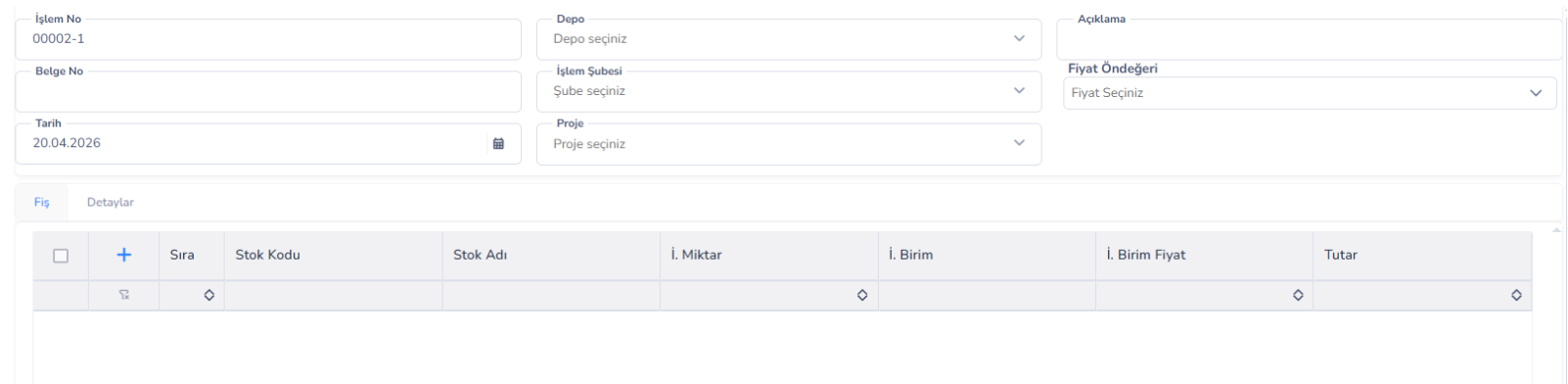
Stok Çıkış İşlemleri (Ekran ve Alanlar Stok Giriş Ekranı ile Aynı):
Stok Çıkış İşlemleri, depolarda bulunan ürünlerin çeşitli nedenlerle stoktan düşülmesini sağlayan işlemleri ifade eder.
Bu işlemler sayesinde:
• Stok miktarları güncellenir
• Maliyet hareketleri oluşur
• Ürünlerin kullanım veya satış süreçleri sistem üzerinde kayıt altına alınır
Stok çıkışları, işlemin amacına göre farklı kategorilere ayrılmıştır. Bu ayrım:
• Operasyonel süreçlerin doğru yönetilmesini sağlar
• Muhasebe kayıtlarının sağlıklı tutulmasına yardımcı olur
STOK ÇIKIŞ TÜRLERİ
1. Mal Çıkışı (Satış Çıkışı):
Müşterilere yapılan satışlar sonucunda ürünlerin stoktan düşülmesini ifade eder.
• En yaygın çıkış türüdür
• Fatura veya irsaliye ile ilişkilidir
• Gelir ve stok hareketi oluşturur
Örnek: Müşteriye satılan 50 adet ürünün stoktan düşülmesi
2. Fire Çıkışı:
Üretim veya depolama süreçlerinde oluşan kayıp, bozulma veya eksilmelerin stoktan düşülmesini sağlar.
• Zayiat takibi için kullanılır
• Maliyet analizinde önemli rol oynar
Örnek: Kırılan, bozulan veya kullanılamaz hale gelen ürünlerin düşülmesi
3. Sair Çıkışı:
Standart satış ve fire işlemleri dışında kalan stok çıkışlarını ifade eder.
• Bağış, promosyon veya özel kullanım durumlarında kullanılır
• Esnek çıkış türüdür
Örnek: Müşteriye ücretsiz verilen ürünler
4. Sayım Çıkışı:
Stok sayımı sonucunda tespit edilen eksik miktarların sistemden düşülmesini sağlar.
• Envanter farklarını düzeltmek için kullanılır
• Stok doğruluğunu sağlar
Örnek: Sistemde 100 görünen ürünün sayımda 95 çıkması → 5 adet çıkış
5. Devir Çıkışı:
Dönem kapanışlarında veya sistem geçişlerinde stokların devredilmesi amacıyla yapılan çıkış işlemleridir.
• Eski dönem stoklarının kapatılması için kullanılır
• Yeni döneme hazırlık sağlar
Örnek: Yıl sonu stoklarının kapatılması
6. Üretime Çıkış:
Üretim sürecinde kullanılmak üzere hammaddelerin veya yarı mamullerin stoktan düşülmesini sağlar.
• Üretim modülü ile entegre çalışır
• Maliyet hesaplamalarının temelini oluşturur
Örnek: Üretimde kullanılacak hammaddelerin depodan çekilmesi
Genel Açıklama
Stok çıkış işlemlerinin kategorilere ayrılması, işletmenin stok hareketlerini doğru analiz etmesini ve maliyet süreçlerini sağlıklı şekilde yönetmesini sağlar.
Her çıkış türü farklı bir iş sürecini temsil eder ve sistemde ayrı ayrı izlenir.
Bu yapı sayesinde:
• Stok kontrolü daha sağlıklı yapılır
• Maliyet analizleri doğru sonuç verir
• Raporlama süreçleri daha verimli hale gelir
Bu doküman yardımcı oldu mu?
Eksik veya geliştirilmesi gereken bir bölüm varsa destek ekibimizle paylaşabilirsiniz.