
Stock Entry / Exit Transactions
Stock Entry Transactions screen is the area where the products entering the business are recorded and tracked on the system. All stock entries made on this screen are listed, filtered and their details can be viewed.
STOCK ENTRY PROCEDURES SCREEN
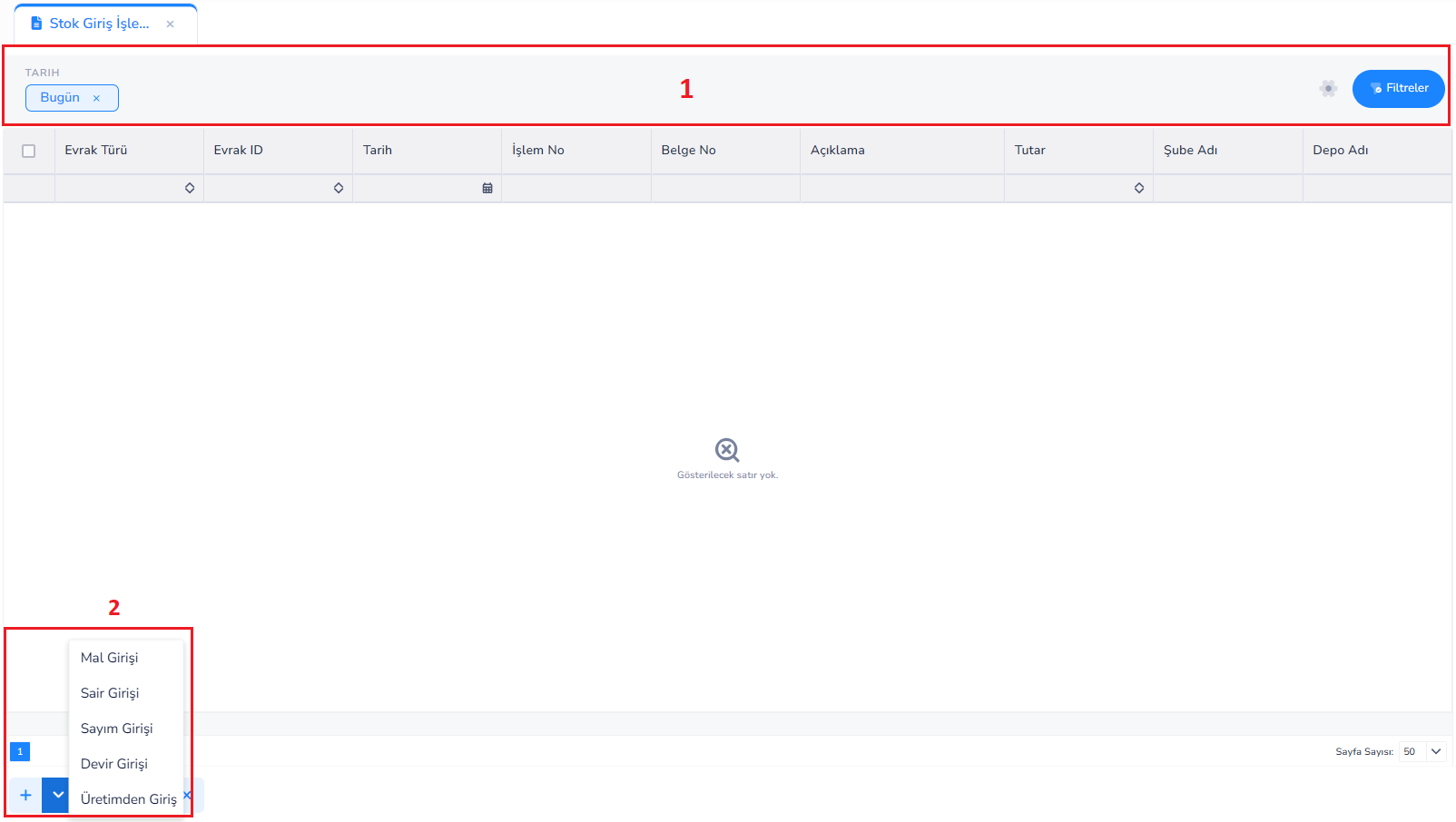
Description
Stock Entry Transactions screen is the area where the products entering the business are recorded and tracked on the system. All stock entries made on this screen are listed, filtered and their details can be viewed.
On the screen; Entry movements are monitored through fields such as document type, date, document number, transaction number, description, amount, branch and warehouse information.
1.Filter Area:
• Records belonging to a specific day or date range can be viewed with the date filter
• Detailed search can be made with the Filters button
• Records are listed according to document type and other criteria
Tablespace:
• All stock entry transactions are shown in a table
• Each row represents a stock entry transaction
• Transaction details can be accessed here
3.General Buttons:
• Stock entry transactions are managed thanks to the buttons in this area.
General Logic
• Stock entries are recorded in the system
• Warehouse and quantity information is updated
• Cost and stock movements occur
• All entry transactions are tracked centrally here
STOCK ENTRY PROCEDURES
Stock Entry Transactions refer to the transactions in which the entry of the company's products into the warehouses is recorded. Thanks to these transactions, stock quantities are updated, cost calculations are made and inventory tracking is carried out in a healthy manner. Within the system, stock entries are divided into different categories depending on the type of transaction. This distinction is of great importance in terms of correct management of both accounting and operational processes.1. Goods Entry (Purchasing Entry)
It refers to the entry of products purchased from suppliers into the warehouse.- The most common type of stock entry
- Associated with invoice or delivery note
- Determines the cost of the product
- It is recorded as a purchase transaction in accounting.
2nd Other Entry
It refers to stock entries other than standard purchasing transactions.- Used for donations, promotions, corrections, etc.
- Preferred for prepaid entries
- Provides flexible use
3rd Count Entry
It ensures that excess quantities detected as a result of stock counting are added to the system.- Used after inventory counting
- Corrects the difference between system and physical stock
- Ensures stock accuracy
4. Transfer Entry
It allows stocks from previous periods to be entered into the system initially.- Used when first installing the system
- Used in period opening transactions
- Allows transfer of previous stocks
5. Introduction from Production
It ensures that the products resulting from the production process are put into stock.- Works integrated with the production module
- Used in finished or semi-finished product entries
- Linked to cost calculations
GOODS RECEIPT
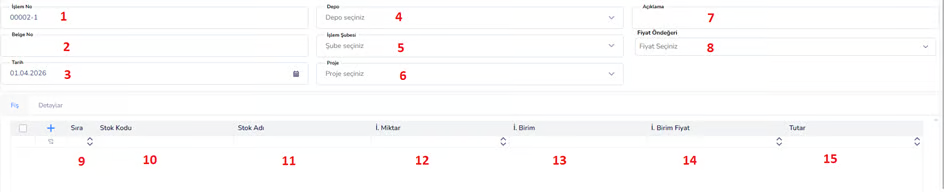
19. Delete:Deletes the entered goods receipt voucher.
20. Cancel / Close: Allows to exit the transaction screen.Details Tab (Special Codes):
Special Code fields on the Goods Entry screen allow the entry transactions to be classified according to business-specific criteria.
Thanks to these fields, stock entries; It can be detailed according to project, department, campaign or different business processes
Special Code (1–4) fields are selected from predefined lists in the system and help create a standard data structure.
In this way, the goods receipts can then be easily filtered, reported and analyzed.
For example:
These fields are actively used when a goods receipt transaction is wanted to be associated with a specific project, branch or expense center
STOCK ISSUE TRANSACTIONS
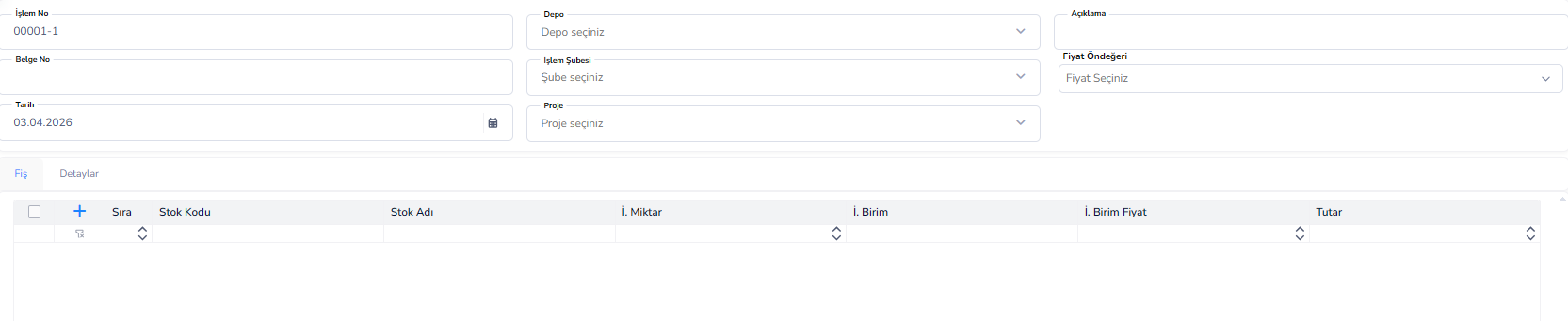
Stock Issue Transactions (Screen and Fields Same as Stock Entry Screen)
Stock Issue Transactions refer to transactions that ensure that products in warehouses are deducted from stock for various reasons.
Thanks to these transactions:
• Stock quantities are updated
• Cost movements occur
• Product usage or sales processes are recorded on the system
Stock issues are divided into different categories depending on the purpose of the transaction.
This distinction:
• Ensures correct management of operational processes
• Helps keep accounting records healthy
1. Goods Issue (Sales Issue)
It refers to the deduction of products from stock as a result of sales made to customers.
• The most common issue type
• It is associated with an invoice or delivery note
• It creates income and stock movement
Example: Deducting 50 products sold to the customer from the stock
2. Fire Exit
It ensures that losses, deteriorations or shortages occurring during the production or storage processes are deducted from the stock.
• Used for loss tracking
• Plays an important role in cost analysis
Example: Deducting products that are broken, damaged or unusable
3. Other Output
It refers to stock issues other than standard sales and wastage transactions.
• Used in donations, promotions or special use cases
• It is a flexible exit type
Example: Products given free to the customer
4. Count Output
It ensures that missing quantities detected as a result of stock counting are deducted from the system.
• Used to correct inventory differences
• Ensures stock accuracy
Example: The number of products that appear to be 100 in the system turns out to be 95 in the count → 5 outputs
5. Cycle Output
These are exit transactions made for the purpose of transferring stocks at period closings or system transitions.
• Used to close old period stocks
• Provides preparation for the new period
Example: Closing year-end stocks
6. Exit to Production
It ensures that raw materials or semi-finished products are deducted from the stock to be used in the production process.
• Works integrated with the production module
• Forms the basis of cost calculations
Example: Removing raw materials to be used in production from the warehouse
General Description
Separating stock issue transactions into categories enables the business to analyze stock movements accurately and manage cost processes in a healthy way.
Each output type represents a different business process and is tracked separately in the system.
Thanks to this structure:
• Inventory control is done more efficiently
• Cost analysis gives accurate results
• Reporting processes become more efficient
Bu doküman yardımcı oldu mu?
Eksik veya geliştirilmesi gereken bir bölüm varsa destek ekibimizle paylaşabilirsiniz.