
Stock
Stock Card Definition screen is the main screen where basic information about the materials or products to be included in the system is defined. Inventory management is configured accurately and regularly by entering product identification information, unit details, discount rates and classification information on this screen.
STOCK CARD DEFINITION SCREEN
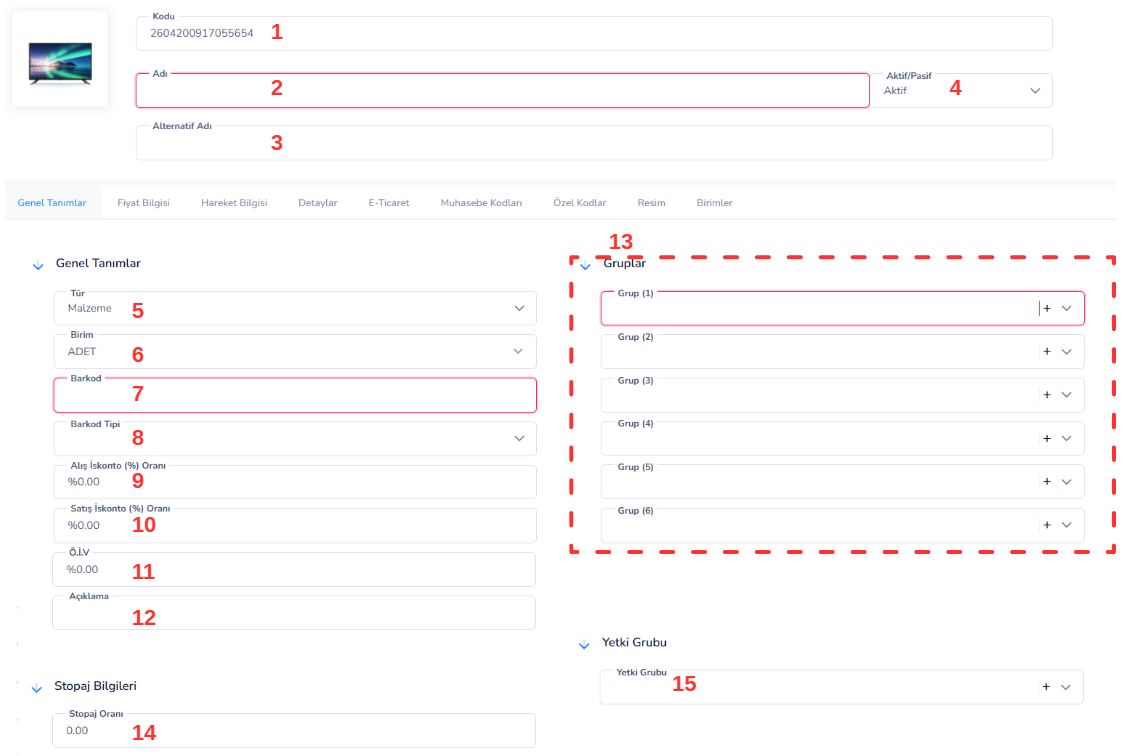
Stock Card Definition screen is the main screen where basic information about the materials or products to be included in the system is defined. Inventory management is configured accurately and regularly by entering product identification information, unit details, discount rates and classification information on this screen.
Top Field Information:
1. Code:This is the unique code of the stock card created in the system. It is defined uniquely for each product and used as a reference in all transactions.
2. Name:This is the field where the name of the product or material is entered. A description should be entered to facilitate search and listing operations.
3. Alternative Name:Allows the product to be recognized by different names. Alternative names can be specified here, especially according to different customer groups or sectors.
4. Active / Passive: Determines the usage status of the stock card:
-
- Active: Card can be used in transactions
- Passive: Card cannot be selected in new transactions
General Definitions:
5. Type:Determines the type of stock card (Material, Product, Service, etc.). This selection directly affects stock movements and accounting processes.
6. Unit: The unit of measurement in which the product will be processed (Piece, Kg, Liter, etc.).
7. Barcode:This is the field where the barcode number of the product is entered. It ensures fast transactions in warehouse and sales transactions.
8. Barcode Type:Determines the barcode standard used (EAN, Code128, etc.).
9. Purchase Discount (%): The discount rate to be applied to purchase transactions.
10. Sales Discount (%): The discount rate to be applied to sales transactions.
11. Special Consumption Tax:This is the field where the Special Consumption Tax rate to be applied to the product is defined.
12. Description:This is a free text field where additional information or notes about the product are entered.
13. Group (1-6):Allows the categorization of the stock card.
Thanks to these fields, the products; By dividing into main groups and sub-groups, reporting, filtering and analysis operations are carried out more regularly.
14. Authorization Group:Enables user-based authorization on the stock card. Users' access to this card may be limited according to the specified authorization group.
15. Withholding Information:This is the field where the withholding tax (tax deduction) rate to be applied to the product is defined.
In this way, withholding tax calculations in buying and selling transactions are made automatically by the system.
PRICE LIST
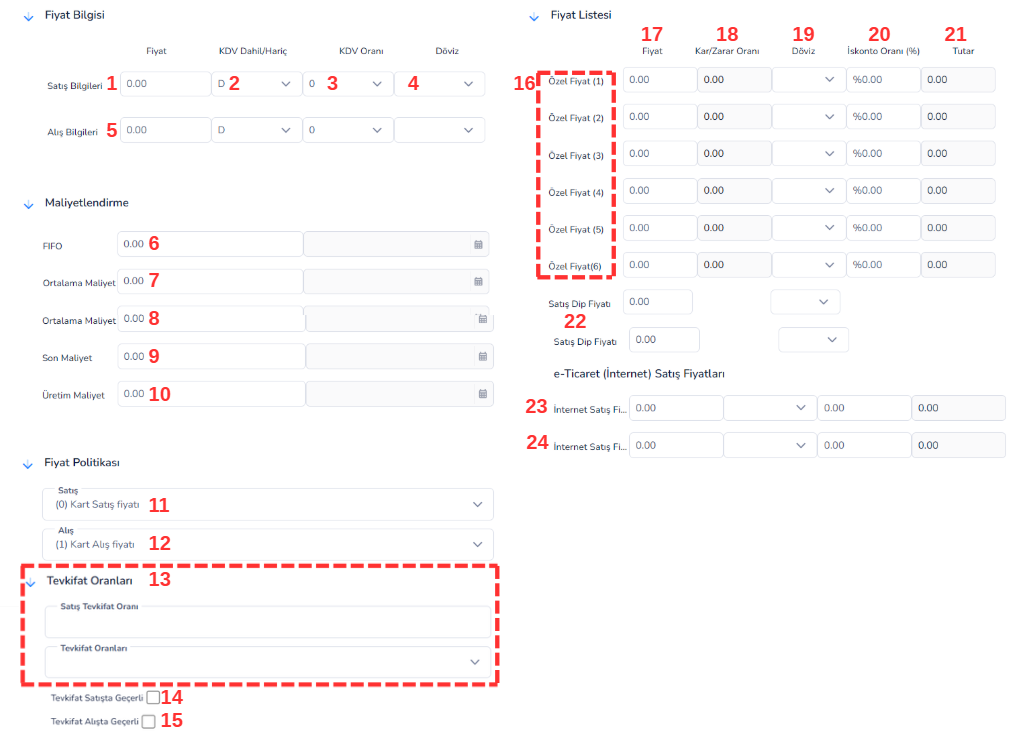
Price Information screen is the section where sales and purchase prices, cost values and pricing policies of the stock card are defined. Thanks to this screen, different price scenarios, cost calculations and commercial conditions of the products can be managed in detail.
Fields:
1. Sales Price:This is the basic price information to be used in the sales transactions of the product. It is used in the system as the default sales price.
2. VAT Included / Excluded:Determines whether the entered price includes or excludes VAT:
-
- Included: Price includes VAT
- Except:VAT is added later
3. VAT Rate:This is the Value Added Tax rate that will be applied to the product. It enables automatic calculations in sales and invoicing transactions.
4. Currency:Indicates the currency in which the price is defined (TRY, USD, etc.).
5. Purchase Price:This is the purchase price used when procuring the product from suppliers. It forms the basis of cost calculations.
6. FIFO: It is the cost information calculated according to the “First In First Out” method.
7. Average Cost:Shows the average cost of products in stock. It is calculated dynamically by the system.
8. Last Cost:This is the cost information of the last purchase of the product.
9. Production Cost:It is the total cost information resulting from the production processes.
10. Sales Price Policy:Determines which price will be used in sales transactions (card sales price, special price, etc.).
11. Purchase Price Policy:Determines which price will be used as basis for purchase transactions (card purchase price, etc.).
12. Sales Withholding Rate:Specifies the withholding rate to be applied in sales transactions.
13. Withholding Rates:Allows selection from defined withholding options.
14. Special Price (1-6): Allows you to define alternative prices for different customer groups or scenarios.
15. Price:The price information determined for the relevant special price line.
16. Profit / Loss Ratio:Indicates the profit or loss ratio to be achieved over the determined price.
17. Currency:Indicates the currency in which the price is valid.
18. Discount Rate (%): Represents the discount rate to be applied.
19. Amount:Shows the net amount based on discount and price information.
20. Sales Bottom Price:Determines the minimum price at which the product can be sold. It prevents users from falling below this price.
21. Internet Sales Price (Wholesale):This is the price information to be used for wholesale customers in online sales channels.
22. Internet Sales Price (Retail):This is the price information to be used for retail customers in online sales channels.
MOTION INFORMATION SCREEN

The Transaction Information screen is the analysis screen where all entry-exit transactions of the stock card are displayed in detail. On this screen, it can be monitored on which dates, with which current accounts and in which warehouses the product was processed. It is an important tool for tracking, controlling and reporting stock movements.
Fields:
1. Start Date:Determines the start date of the stock transactions to be displayed.
2. End Date:Determines the date by which stock transactions will be listed.
3. Current:Used to filter stock movements of a specific customer or supplier.
4. Warehouse:Allows viewing of stock movements on a specific warehouse basis.
5. Find Transactions:Lists stock transactions according to the selected filter criteria.
6. Get Report: Allows you to receive a report of stock movements displayed in a list.
7. Date:Indicates the date the stock movement took place.
8. Document Name:Indicates the document type to which the transaction belongs (Invoice, Delivery Note, etc.).
9. Current Code: The code of the current account where the transaction is carried out.
10. Client Name:Indicates the name of the customer or supplier with whom the transaction was made.
11. Document Number: The document number of the relevant transaction registered in the system.
12. Output Quantity:It refers to the amount of product leaving the stock.
13. Net Unit Price:It is the net unit price information applied during the transaction.
14. Currency Rate:Indicates the exchange rate used during the transaction.
15. Description: Additional note or explanation information about the transaction.
16. Warehouse Name: Indicates the warehouse information where the stock movement takes place.
DETAILS SCREEN
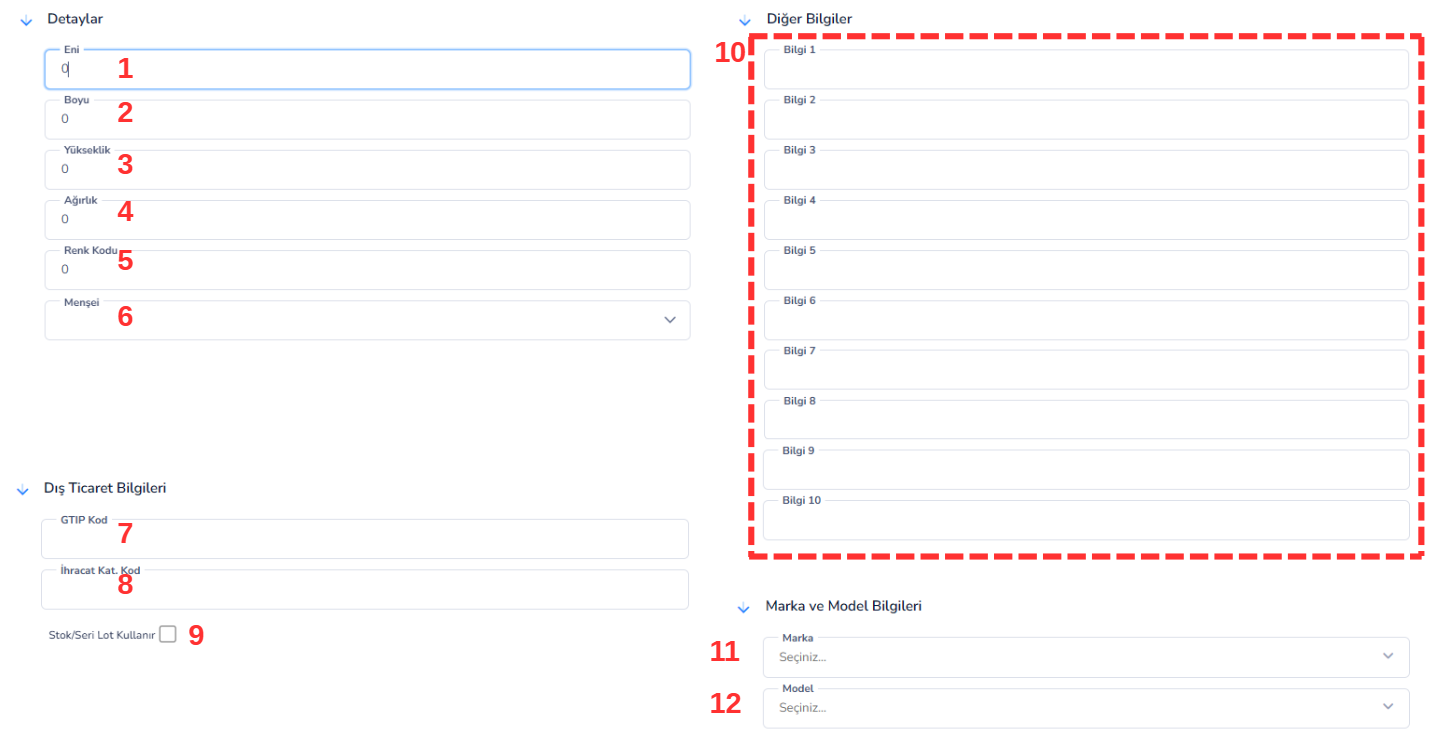
Details screen is the section where the physical properties, foreign trade information and additional definitions of the stock card are entered. Thanks to this area, the dimensional, logistics and classification information of the products can be defined in detail.
Fields:
1. Width:It refers to the width measurement of the product. It is used in storage and shipment planning.
2. Length:Indicates the length information of the product. It is important in volume calculations.
3. Height:It refers to the height measurement of the product. It is used in warehouse layout and packaging processes.
4. Weight: The total weight information of the product. It plays a critical role in transportation and cost calculations.
5. Volume Code:This is the code that indicates the volumetric classification of the product. It is used as a reference in logistics processes.
6. Origin: The country where the product is produced. It is important for foreign trade and legal transactions.
7. HS Code:Customs Tariff Statistics Position code. It is used for product classification in import and export transactions.
8. Export Cat. Code:This is the code indicating the export category of the product. It is used in foreign trade reporting.
9. Stock / Serial Lot Usage:When checked, it allows serial or lot tracking for the product. It is especially used in sectors requiring production and traceability.
10. Information (1-10):These are additional user-specific data entry fields. It can be used for different purposes according to business needs (technical specification, reference code, note, etc.).
11. Brand: The brand information to which the product belongs. It is used in filtering and reporting.
12. Model: The model information of the product. It enables the separation of variants in the same product group.
E-COMMERCE SCREEN
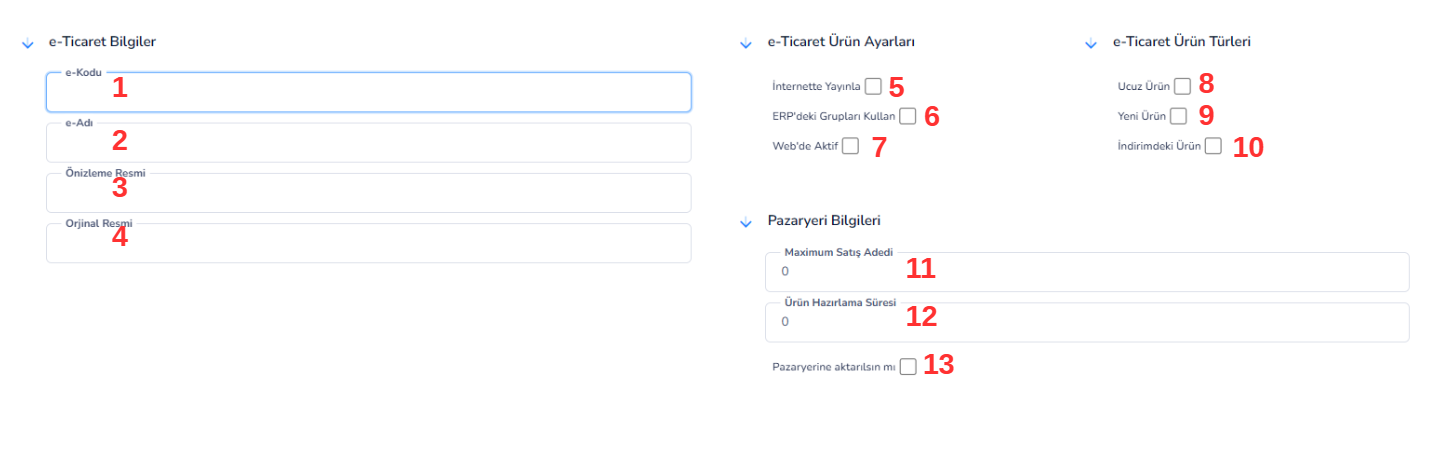
The E-Commerce screen is the section used to define the information and behavior settings of the stock card products to be used in online sales channels. Thanks to this screen, how the products will appear on the websites, in which categories they will be included and the sales rules can be determined in detail.
Fields:
1. e-Code:This is the special code of the product to be used in e-commerce systems. It is used in integration and product matching processes.
2. e-Name:This is the name of the product that will be displayed on e-commerce platforms. It is recommended to enter it in a way that is SEO compatible and user friendly.
3. Preview Image:This is a small-sized image that will be shown on the product's listing pages (category, etc.).
4. Original Image:This is the high-resolution main image shown on the product's detail page.
5. Publish Online:When checked, the product will be published on e-commerce platforms.
6. Use Groups in ERP:Enables the use of product groups defined in the ERP system on the e-commerce side.
7. Active on the Web: Determines whether the product is actively available for sale on the website.
8. Cheap Product: Allows the product to be shown in the campaign or affordable product category.
9. New Product: Allows the product to be listed in the "new arrivals" category.
10. Product on Sale: Allows the product to be shown among discounted products.
11. Maximum Sales Quantity:Limits the maximum quantity of items that can be purchased in one order.
12. Product Preparation Time:Indicates the preparation time of the product after the order (pre-shipping time).
13. Transfer to JetStok: When checked, product information is transferred to the JetStok system and integration is achieved.
ACCOUNTING CODES
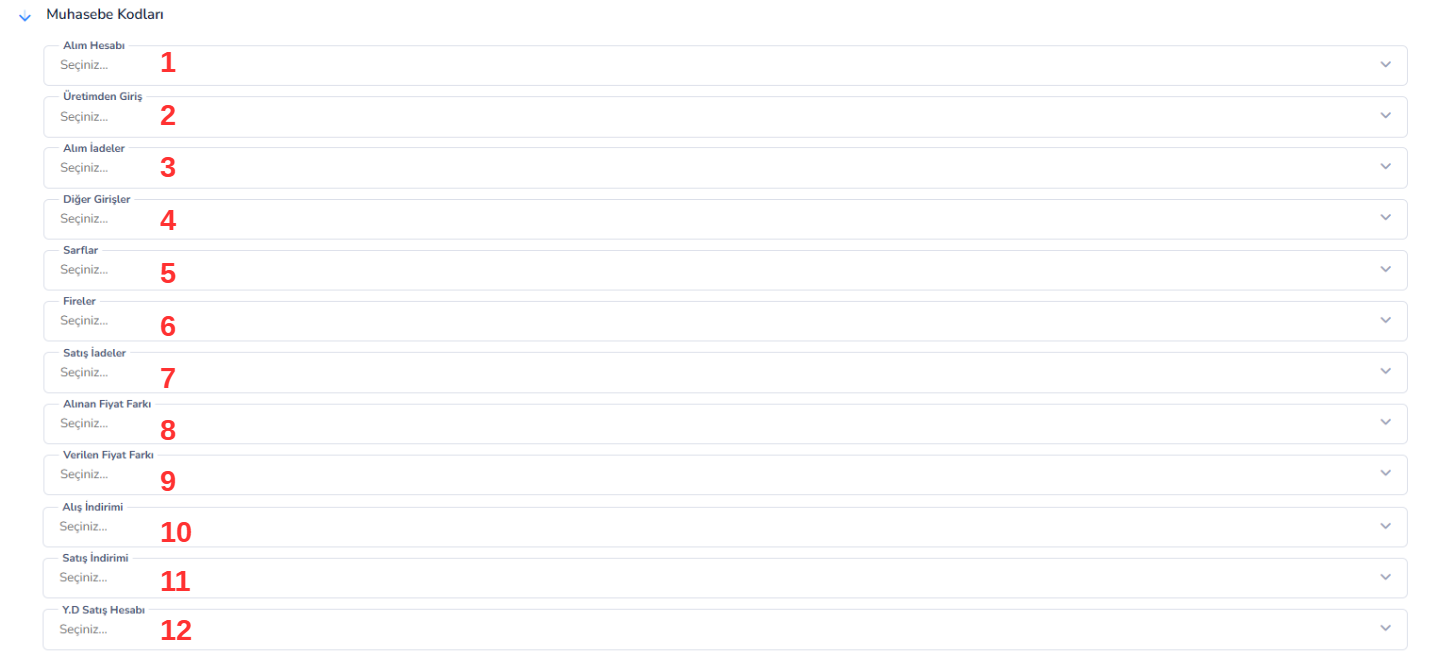
The Accounting Codes screen is the section that determines which accounting accounts will associate all financial transactions of the stock card with. Thanks to the definitions made in this field, purchases, sales and other stock movements are reflected in the accounting system automatically and accurately.
Fields:
1. Purchasing Account:This is the accounting account to be used in product purchasing transactions. Purchase invoices are accounted through this account.
2. Entry from Production:This is the account code in which the products entering the stocks as a result of production will be accounted.
3. Purchase Returns:This is the accounting account to be used in case of returning purchased products.
4. Other Entries: This is the accounting account where stock entries other than purchases and production will be recorded.
5. Consumables: This is the expense account where products consumed or used from stock are accounted for.
6. Wastes:This is the accounting account where losses (waste) occurring during production or stock processes are recorded.
7. Sales Returns:This is the account in which the products returned from the customer after sales are accounted.
8. Price Difference Received:This is the accounting account where price differences arising from suppliers will be recorded.
9. Given Price Difference:This is the accounting account where price differences reflected to customers will be recorded.
10. Purchase Discount: This is the accounting account where the discounts applied to purchase transactions are recorded.
11. Sales Discount:This is the account in which discounts given to customers in sales transactions are accounted.
12. YD Sales Account:This is the accounting account to be used in foreign sales transactions. It allows export transactions to be tracked separately.
SPECIAL CODES SCREEN
Special Codes screen is a flexible identification area that allows stock cards to be classified according to business-specific criteria. Thanks to these fields, company-specific data entries can be made outside the standard system structure and advanced filtering and reporting opportunities are provided.
UNITS SCREEN
Units screen is the area where the measurement units of the stock card are defined and barcode transactions related to these units are managed. Thanks to this screen, products can be tracked in different units (pieces, packages, parcels, etc.) and separate barcode definitions can be made for each unit.
Bu doküman yardımcı oldu mu?
Eksik veya geliştirilmesi gereken bir bölüm varsa destek ekibimizle paylaşabilirsiniz.