
Hizmet Kartı
Bu dokümanın ayrıntılarını inceleyin.
HİZMET KARTI TANIMLANAMA EKRANI
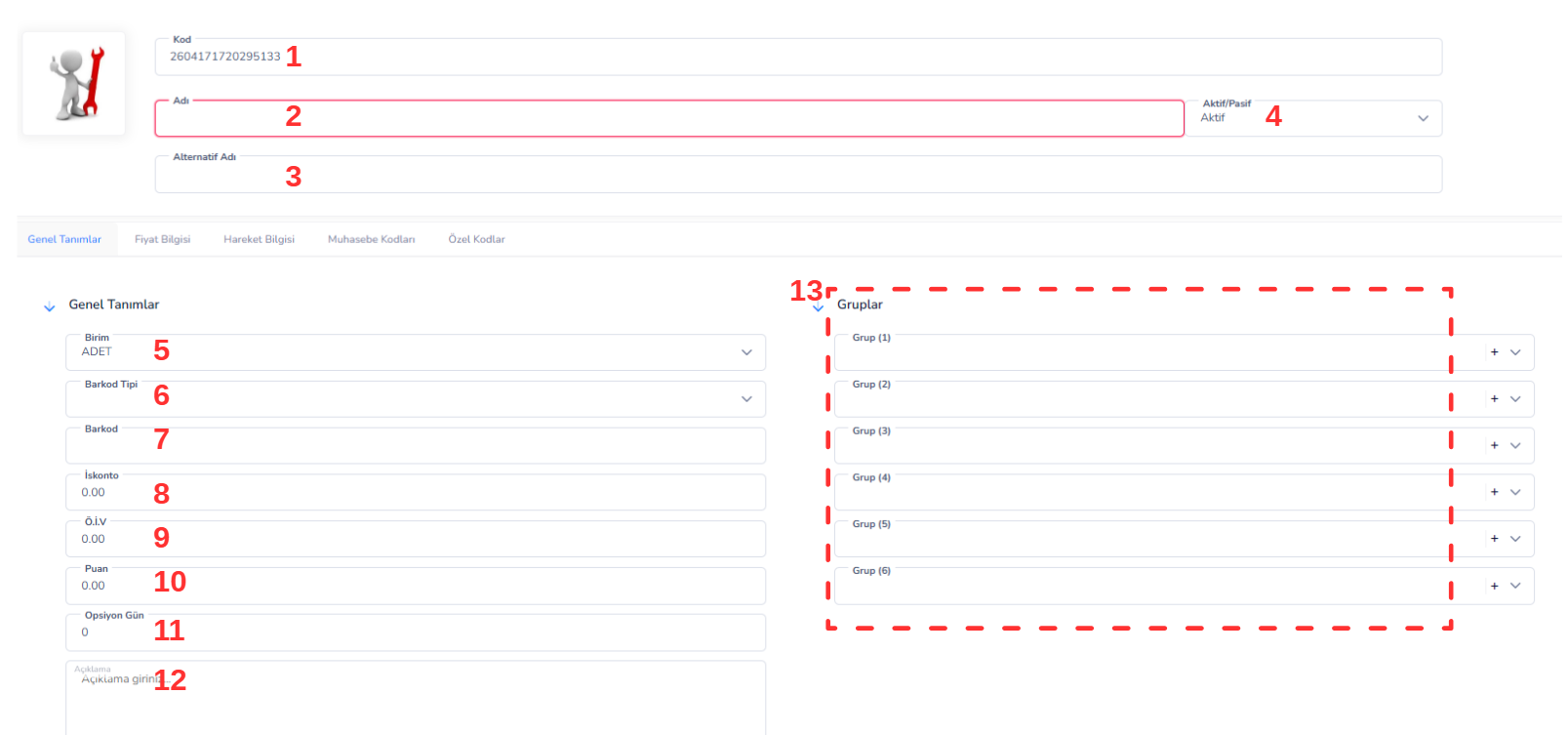
Üst Alan Bilgileri:
1. Kodu: Hizmet kartına ait benzersiz koddur. Sistem tarafından otomatik oluşturulabilir veya manuel olarak tanımlanabilir. 2. Adı: Hizmetin adının girildiği alandır. (Örnek: Danışmanlık Hizmeti, Teknik Servis, Kurulum vb.) 3. Alternatif Adı: Hizmetin farklı isimlerle tanımlanabilmesini sağlar. Raporlama ve arama işlemlerinde kolaylık sunar. 4. Aktif/Pasif: Hizmet kartının kullanım durumunu belirler.-
- Aktif: Hizmet kullanılabilir
-
- Pasif: Yeni işlemlerde seçilemez
HİZMET FİYAT BİLGİSİ EKRANI
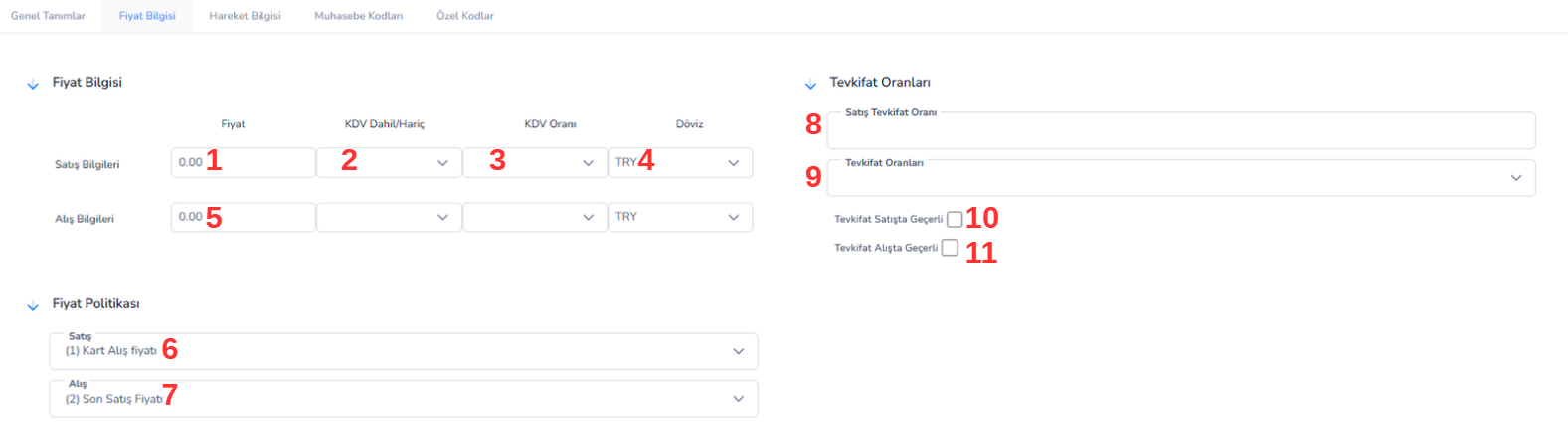
Satış ve Alış Bilgileri:
1. Satış Fiyatı: Hizmetin müşterilere sunulurken kullanılacak satış fiyatıdır. Faturalama ve teklif süreçlerinde temel alınır. 2. KDV Dahil/Hariç: Girilen fiyatın KDV dahil mi yoksa hariç mi olduğunu belirler.-
- Dahil: Fiyat KDV içerir
-
- Hariç: KDV ayrıca hesaplanır
Fiyat Politikası:
6. Satış Fiyat Politikası: Hizmet satışlarında hangi fiyatın kullanılacağını belirler. (Kart fiyatı, özel fiyat vb.) 7. Alış Fiyat Politikası: Hizmet maliyet hesaplamalarında hangi fiyatın esas alınacağını belirler.Tevkifat Oranları:
8. Satış Tevkifat Oranı: Hizmet satışlarında uygulanacak tevkifat oranını belirtir. 9. Tevkifat Oranları: Tanımlı tevkifat seçeneklerinden seçim yapılmasını sağlar. 10. Tevkifat Satışta Geçerli: İşaretlendiğinde tevkifat hizmet satışlarında uygulanır. 11. Tevkifat Alışta Geçerli: İşaretlendiğinde tevkifat hizmet alışlarında uygulanır. Genel Açıklama Hizmet Fiyat Bilgisi ekranı, hizmetlerin doğru şekilde fiyatlandırılmasını ve vergi süreçlerinin yönetilmesini sağlar. Bu ekran üzerinden yapılan tanımlamalar; satış, faturalama ve muhasebe süreçlerinde doğrudan kullanılır. Özellikle hizmet bazlı gelir takibi ve kârlılık analizleri açısından büyük önem taşır.HİZMET HAREKETLERİ SEKMESİ

Filtreleme Alanları:
1. Başlangıç Tarihi: Görüntülenmek istenen hizmet hareketlerinin başlangıç tarihini belirler. 2. Bitiş Tarihi: Hizmet hareketlerinin hangi tarihe kadar listeleneceğini belirler. 3. Cari: Belirli bir müşteri veya tedarikçiye ait hizmet hareketlerini filtrelemek için kullanılır. 4. Depo: Hizmetin ilişkilendirildiği depo veya operasyon birimi bazında filtreleme yapılmasını sağlar. İşlem Butonları: 5. Hareketleri Bul: Seçilen filtre kriterlerine göre hizmet hareketlerini listeler. Liste Alanı (Hareket Tablosu): 6. Tarih: Hizmetin gerçekleştirildiği tarihi gösterir. 7. Evrak Adı: İşlemin ait olduğu belge türünü belirtir (Fatura, Hizmet Fişi vb.). 8. Cari Kodu: Hizmetin sunulduğu müşteri veya ilgili cari hesabın kodudur. 9. Cari Adı: Hizmet verilen müşteri veya ilgili cari hesap adını gösterir. 10. Belge No: İlgili işlemin sistemde kayıtlı belge numarasıdır. 11. Çıkış Miktarı: Sunulan hizmetin miktarını ifade eder (saat, gün, adet vb.). 12. Net Birim Fiyat: Hizmet için uygulanan net birim fiyat bilgisidir. 13. Döviz Kur: İşlem sırasında kullanılan döviz kurunu gösterir. 14. Açıklama: İşleme ait ek bilgi veya notların girildiği alandır. Genel Açıklama Hizmet Hareketleri ekranı, işletmenin sunduğu hizmetlerin detaylı takibini ve analizini sağlar. Bu ekran üzerinden hizmet bazlı gelirler, müşteri ilişkileri ve işlem geçmişi incelenebilir. Doğru kullanıldığında, performans analizi, müşteri bazlı değerlendirme ve finansal kontrol süreçlerinde önemli katkı sağlar.HİZMET MUHASEBE KODLARI EKRANI
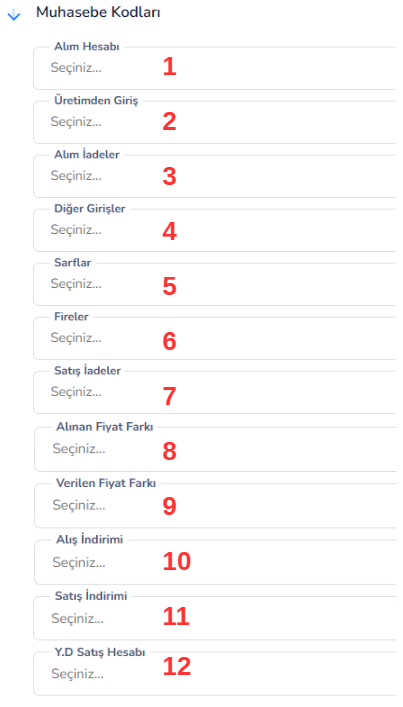
Muhasebe Hesap Tanımları:
1. Alım Hesabı: Hizmetin satın alınması durumunda kullanılacak muhasebe hesabıdır. Dış kaynaklı hizmet giderleri bu hesap üzerinden takip edilir. 2. Üretim Giriş: Hizmetin üretim süreçlerine dahil edilmesi durumunda kullanılacak muhasebe hesabıdır. 3. Alım İadeler: Satın alınan hizmetlerin iptal veya iade edilmesi durumunda kullanılacak muhasebe hesabıdır. 4. Diğer Girişler: Standart işlemler dışında kalan hizmet girişlerinin muhasebeleştirildiği hesaptır. 5. Sarflar: Hizmetin doğrudan gider olarak işlendiği durumlarda kullanılan muhasebe hesabıdır. 6. Fireler: Hizmet süreçlerinde oluşan kayıp veya verimsizliklerin kaydedildiği hesaptır. 7. Satış İadeler: Sunulan hizmetlerin iade edilmesi durumunda kullanılacak muhasebe hesabıdır. Fiyat Farkı ve İndirim Hesapları: 8. Alınan Fiyat Farkı: Hizmet alımlarında oluşan fiyat farklarının kaydedildiği muhasebe hesabıdır. 9. Verilen Fiyat Farkı: Hizmet satışlarında oluşan fiyat farklarının muhasebeleştirildiği hesaptır. 10. Alış İndirimi: Hizmet alımlarında uygulanan indirimlerin kaydedildiği hesaptır. 11. Satış İndirimi: Hizmet satışlarında müşterilere uygulanan indirimlerin muhasebeleştirildiği hesaptır. Satış Hesapları: 12. YD Satış Hesabı: Yurtdışı hizmet satışlarında kullanılacak muhasebe hesabıdır. İhracat hizmetlerinin ayrı takip edilmesini sağlar. Genel Açıklama Hizmet Muhasebe Kodları ekranı, hizmet modülü ile muhasebe sistemi arasında entegrasyon sağlayan kritik bir bileşendir. Bu alanda yapılan doğru tanımlamalar sayesinde hizmet gelirleri ve giderleri otomatik olarak ilgili hesaplara yansıtılır. Böylece finansal doğruluk artar, manuel işlem ihtiyacı azalır ve raporlama süreçleri hızlanır.HİZMET ÖZEL KODLAR EKRANI
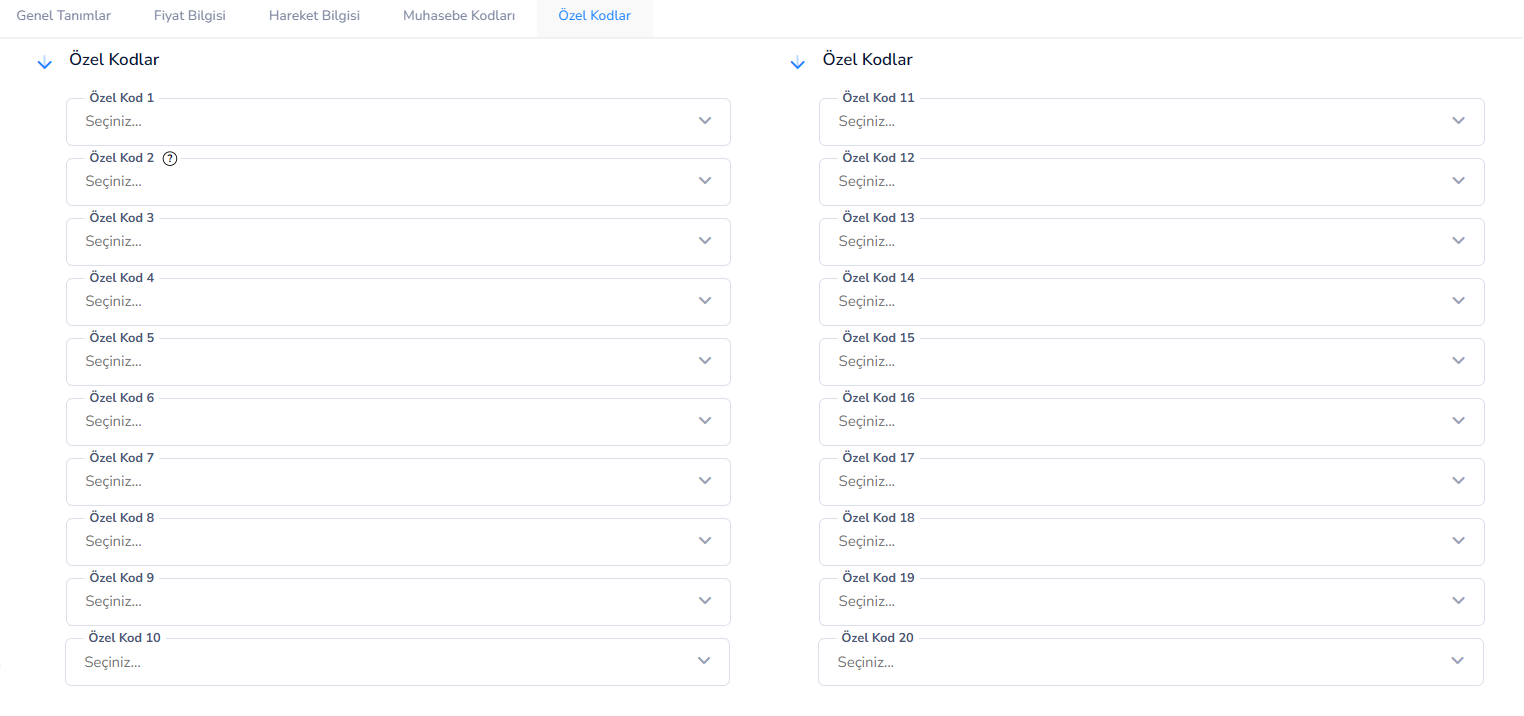
- Hizmet türüne göre sınıflandırma (Danışmanlık, Teknik Servis vb.)
- Departman bazlı ayrım (IT, Destek, Operasyon vb.)
- Proje veya iş bazlı hizmet takibi
- Müşteri segmentasyonu
- Kampanya veya sözleşme bazlı sınıflandırma
- İç süreçlerde kullanılan özel referans kodları
- Hizmetlerin detaylı kategorize edilmesini sağlar
- Gelişmiş filtreleme ve raporlama imkânı sunar
- Proje ve müşteri bazlı analizleri kolaylaştırır
- Büyük veri setlerinde hizmetlerin hızlı bulunmasını sağlar
Bu doküman yardımcı oldu mu?
Eksik veya geliştirilmesi gereken bir bölüm varsa destek ekibimizle paylaşabilirsiniz.