Cash Statement Report is a report that lists in detail all entry-exit transactions of the cash register within a certain date range. It allows you to see step by step how the chassis changes.
What is it for?
Shows all transactions (collection, payment, transfer) in the cash register
Allows you to keep track of daily / weekly / monthly cash
Helps analyze how the cash balance is formed
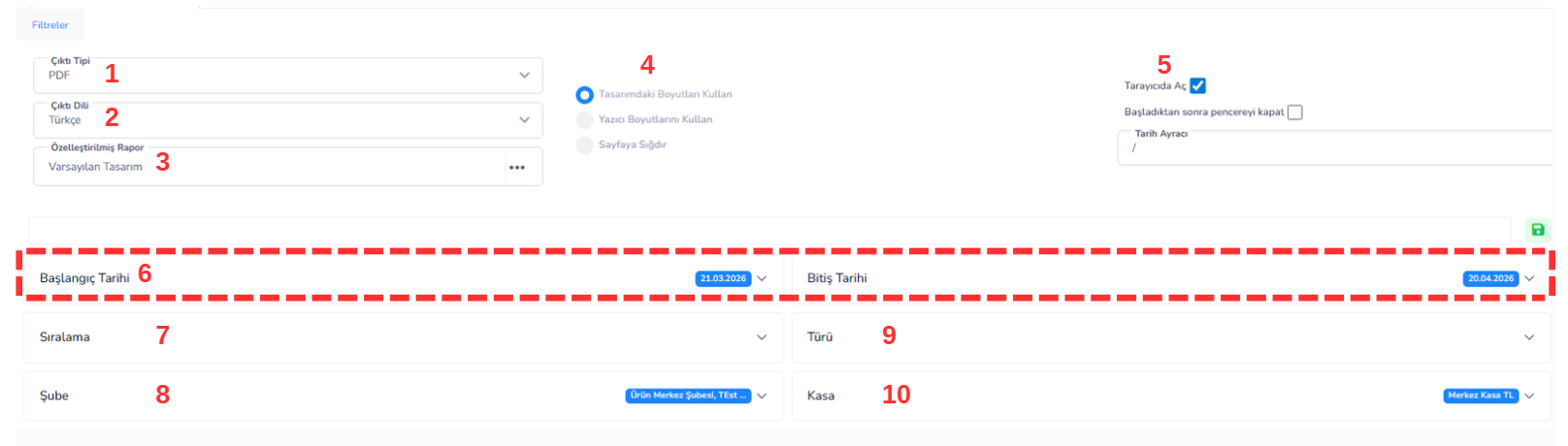
Filter Fields:1.Output Type: PDF, Excel etc.
2.Output Language: Report language
3.Customized Report:report format
4.Use Dimensions in Design:Standard report format
5.Open in Browser: Shows the report directly on the screen
6.Start / End Date: Which date range of transactions will be listed
7.Sorting: Listing order (date etc.)
8th Branch: Which branch's safe box belongs to?
9.Type: Transaction type filter (all / collection / payment etc.)
10.Cash: Which cash register's report
Report Content (What Appears in the Output):
Transaction date
Transaction type (collection / payment / transfer)
Description
Debit/Credit amounts
Cash balance (after transaction)
Usage Scenario:
Cash check at the end of the day
Examining cash transactions on a specific date
Incorrect transaction or missing record check
CASH STATEMENT DAILY REPORT
Cash Statement Daily Report is a report that summarizes the movements in the cash register on a daily basis within the selected date range. Unlike detailed extract, it provides more summary and faster analysis.
What is it for?
Shows daily cash entry-exit totals
Facilitates end-of-day cash control
Allows to analyze cash register performance on a daily basis
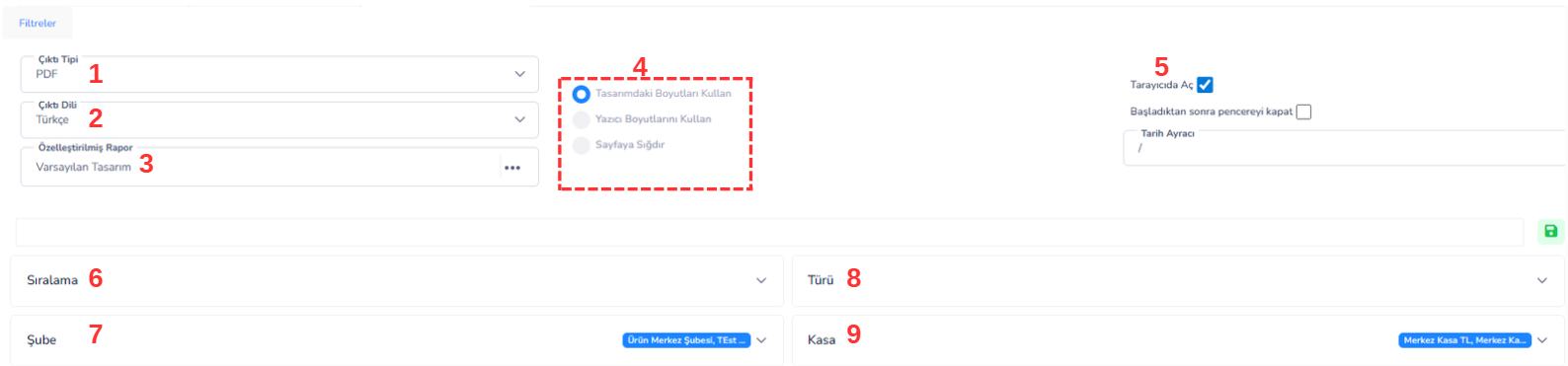
Filter Fields:1.Output Type: PDF / Excel
2.Output Language: Report language
3.Open in Browser: View the report on the screen
4.Customized Report:report format
5.Design Settings: Page layout options
6.Start / End Date: Date range for receiving daily reports
7.Sorting: Listing order
8th Branch: Which branch's safe box belongs to?
9.Type: Transaction type filter (all / collection / payment etc.)
10.Cash: Which cash register's report
Report Content:
Daily total collection (entry)
Daily total disbursement (output)
End of day cash balance
Movement summary by day
Usage Scenario
At the end of the day, “What happened at the cash register today?” quickly see the question
Branch based daily cash comparison
Cash open / overflow check
CASH TOTALS REPORT
Cash Totals Report is a report that summarizes the total debit, credit and balance information in the cash registers according to the selected criteria. It is used to see the general situation rather than detailed movement.
What is it for?
Shows the current total status of the cash registers
Allows you to see all cash balances on one screen
Provides general financial control based on branch and cash register
Filter Fields:1.Output Type: PDF / Excel
2nd Output Language: Turkish etc.
3.Customized Report:report format
4.Design Settings: Page layout options
5.Open in Browser: View the report directly
6.Sorting: Listing order
7.Type: Filtering by transaction type (all / specific transactions)
8th Branch: Which branch's safes belong to?
9.Cash: A specific safe or all safes
Report Content:
Total Debt (Entries)
Total Receivables (Outflows)
Net Cash Balance
Usage Scenario
At the end of the day, "How much money is in the safe?" see
To compare if there is more than one safe
Financial overview
✓
Bu doküman yardımcı oldu mu?
Eksik veya geliştirilmesi gereken bir bölüm varsa destek ekibimizle paylaşabilirsiniz.