
Employee
Review the details of this document.
DEFINING PERSONNEL CARD
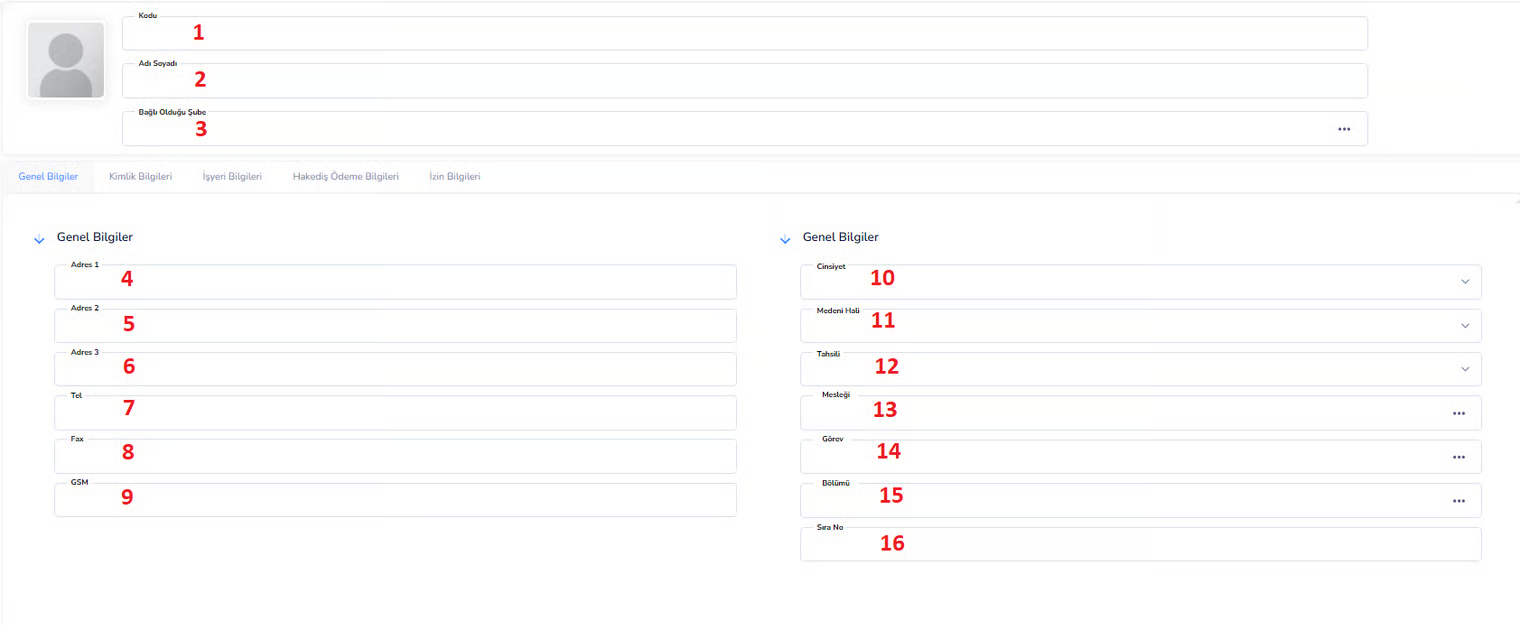
Right Area (Personal/General Information):
10. Gender:Gender information of the personnel 11. Marital Status:Married / Single status 12. Education:Educational status (High School, University, etc.) 13. Profession: Area of expertise / work 14. Position:Role within the organization Ex: Accounting Specialist 15. Department:Department where he/she works Ex: Human Resources 16. Sequence Number:The number used for listing and sorting Tab Structure
- General Information: Contact and basic information
- Identity Information: TR ID, date of birth, etc. official information
- Workplace Information:Work details
- Progress Payment Information: Salary and payment information
- Leave Information: Leave records of the personnel
CREDENTIAL INFORMATION SCREEN
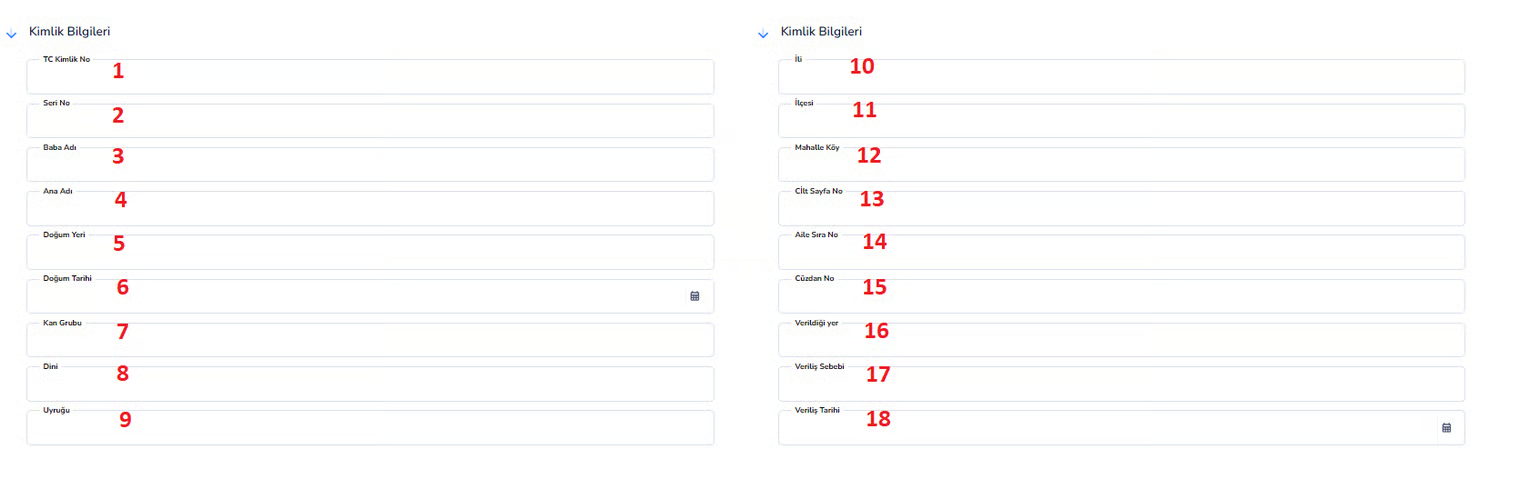
Left Field:
1. TR Identity Number:Turkish Republic of the personnel. is the identification number. It is the most important and mandatory field 2. Serial Number:The serial number found on the ID card 3. Father's Name: Staff's father's name information 4. Mother's Name: Staff's mother's name information 5. Place of Birth: Information about the city or place of birth of the personnel 6. Date of Birth:The date of birth of the personnel 7. Blood Type:The blood type information of the personnel is important for emergencies 8. Religious: Religious knowledge of staff is usually optional 9. Nationality:Citizenship information of the personnel Ex: T.R., Foreign Right Field:
10. Province:Province where the population is registered 11. District:The district where the population is registered 12. Neighborhood Village:Registered neighborhood or village information 13. Volume Page Number:Volume and page number in the civil registry book 14. Family Sequence Number:Sequence number in the family registry 15. Wallet Number:ID card number 16. Place of Issue:The place where the ID card is issued 17. Reason for Issue: Reason for issuing the ID (initial, renewal, etc.) 18. Date of Issue:Date the ID card is issued Operation Logic:- The official identity information of the personnel is entered into the system completely
- This information is used for official records and verification
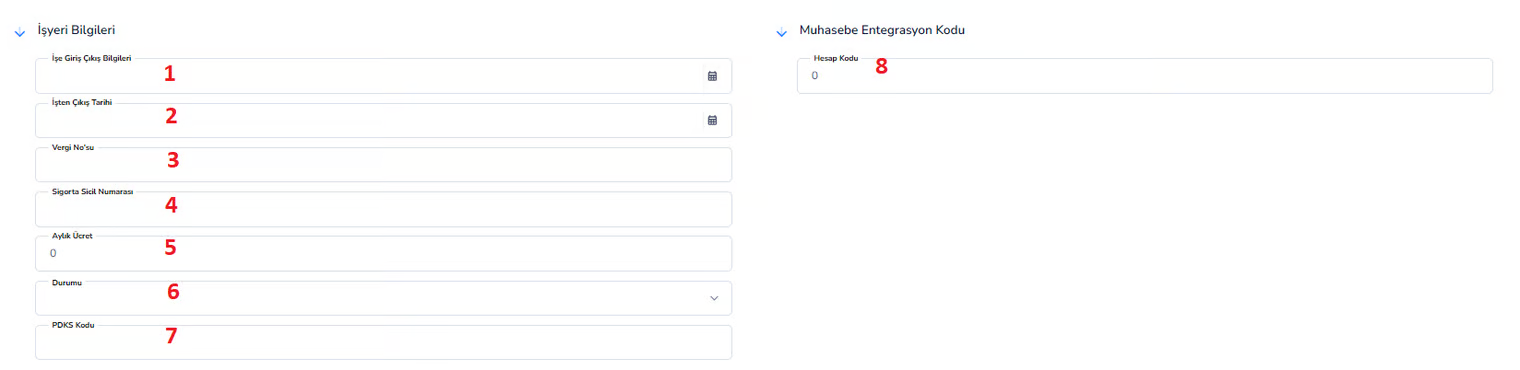
WORKPLACE INFORMATION
PROGRESS / PAYMENT INFORMATION

Top Area:
1. Start Date:The start date of the records to be displayed • Used to select a specific period 2. End Date: The end date of the records to be displayed • The period is determined by the start 3. Find (Button):Used to list records according to the selected date rangeList Area:
4. Date:The date the transaction was made 5. Type:Indicates the type of transaction 6. Description: It is the explanation information about the transaction. 7. Progress Payments: Shows the gross amounts earned by the personnel 8. Deductions: Shows deductions made from personnel 9. Payments: Shows the net payment amount made to the personnel 10. Balance:Indicates the remaining receivables or debts of the personnel 11. B/A:Represents debit/credit statusOperation Logic:
• Net payment is calculated based on progress payments and deductions • Payments made are processed into the system • Remaining balance is constantly monitored • Salary, premium and deduction movements of the personnel are monitored periodicallyDescription
This screen is the area where the wages earned by the staff, deductions made and payments made are tracked in detail. Transactions made within a certain date range are listed and the staff's net payment status and balance information are displayed. It is actively used in payroll and salary management processes.Bu doküman yardımcı oldu mu?
Eksik veya geliştirilmesi gereken bir bölüm varsa destek ekibimizle paylaşabilirsiniz.