
Till
2.Current: It is the information of the person or company with which the transaction is made. When this field is selected, the relevant current account is affected.
CASH CARD IDENTIFICATION SCREEN
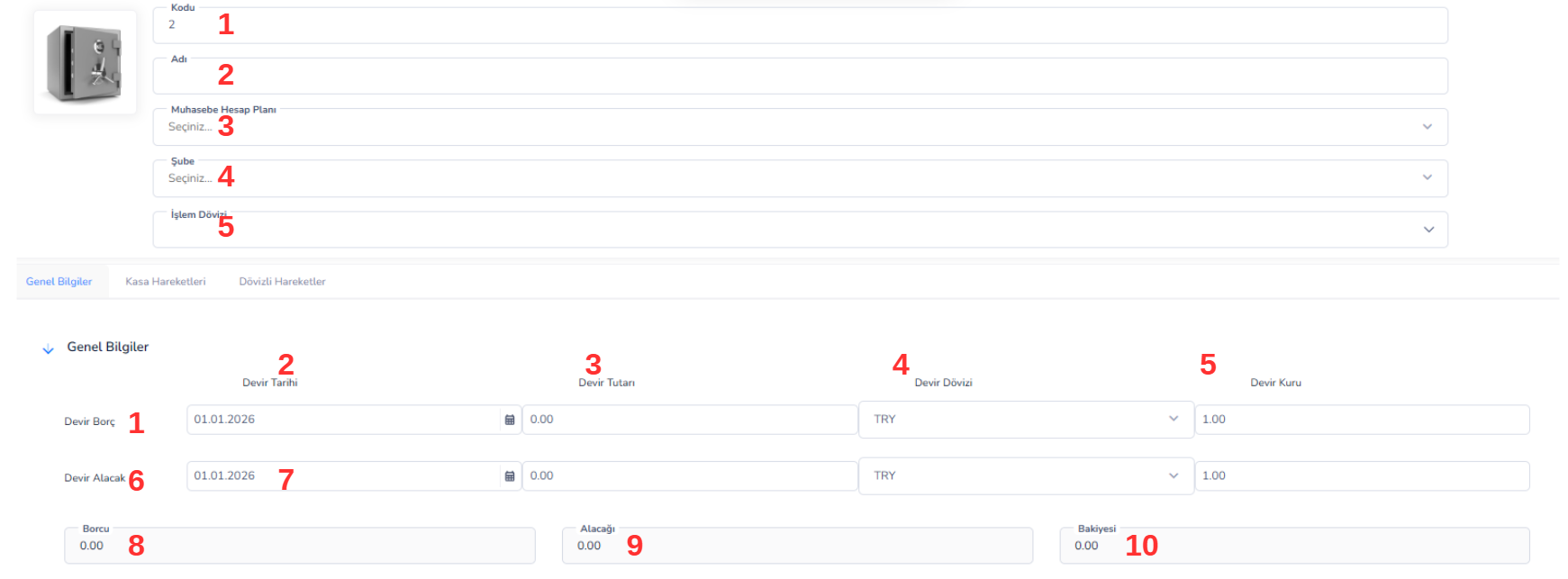
-
- Central Vault
-
- USD Safe
-
- Branch Cash Box
-
- TRY
-
- USD
-
- EUR
- Debt → Cash inflow
- Credit → Cash out
CASE MOVEMENTS

-
- Collection
-
- Payment
-
- Transfer
-
- All
List Area (Grid) Columns:
5. Processing Location:Indicates the module or source area where the processing takes place. (Ex: Current, Cash, Bank) 6. Transaction Type:The type of transaction performed is specified. (Ex: Collection, Payment) 7. Date:The date information on which the transaction took place. 8. Document Number:The reference or document number of the transaction. 9. Amount:Shows the transaction amount. 10. Description:This is the description information entered regarding the transaction. 11. Foreign Currency Debt:Indicates the amount entered into the cash register in foreign currency. 12. Foreign Currency Receivable:Indicates the amount coming out of the cash register in foreign currency. 13. Foreign Currency Balance:Shows the foreign currency balance after the transaction. 14. Type:Specifies the general category of the transaction. 15. Cash Code:The safe code to which the transaction belongs. 16. Cash Name:The name of the cash register to which the transaction belongs. 17. Location Type:Indicates the type of module the transaction comes from. 18. Location ID / Ref ID / Document ID:These are the reference and connection IDs of the transaction within the system.CASH TRANSACTION TYPES (COLLECTION / DISPOSAL / DELIVER)
Cash transactions are used to track the cash inflows and outflows of the business. These operations are divided into 3 main categories: 1. Cash Collection (Money Input) Cash collection process is used when there is money inflow to the cash register. When to use?- When cash is collected from the customer
- When the current receivable is collected
- When payment is received in cash
- When cash payment is made to the supplier
- Expense payments (rent, electricity, etc.)
- Personnel payments
- Central cash register → Branch cash transfer money
- TL cash → USD cash transfer
- Inter-vault editing
CASH COLLECTION RECEIPT
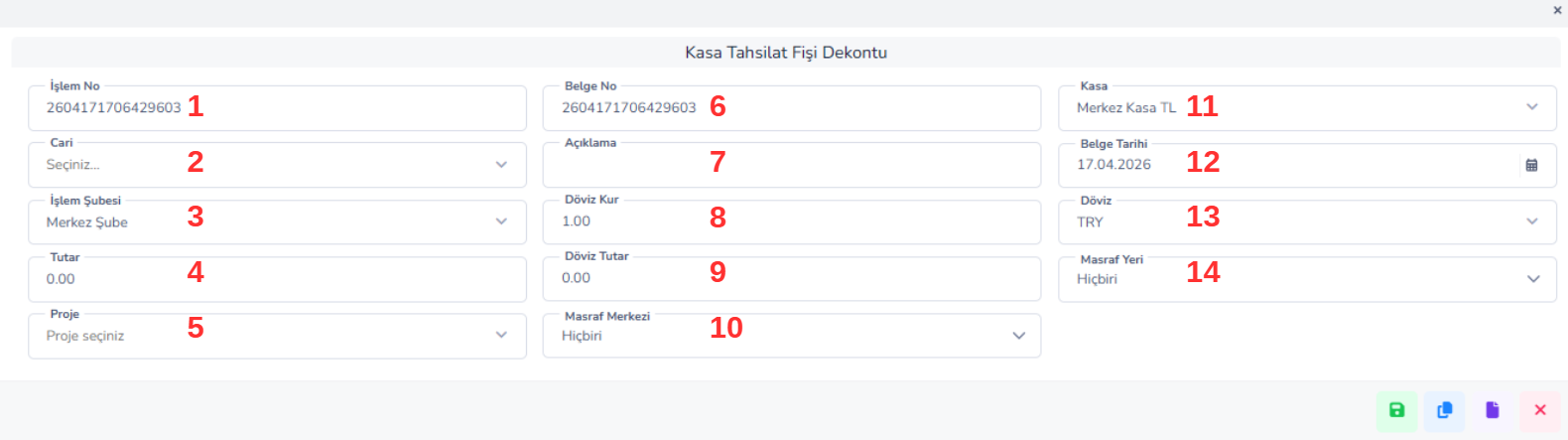
- X”Recording collections from the customer
- Following cash inflows
- Closing current account debts
- Monitoring financial movements regularly
CASH PAYMENT VOUCHER (PAYMENT RECEIPT)
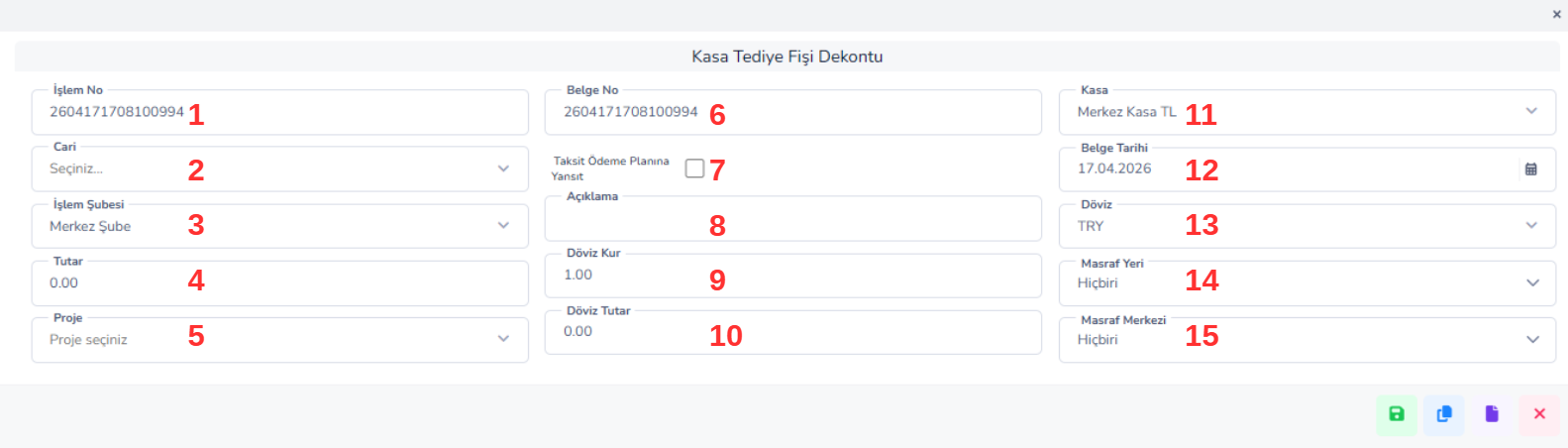
- Records payments made from the cash register
- Follows up payments made to current accounts
- Documents expenses, expenses and cash outflows
- Reduces cash balance
1.Transaction Number: It is the unique transaction number automatically generated by the system.
2.Current: It is the information of the person or company with whom the transaction was made. When this field is selected, the relevant current account is affected.
3.Transaction Branch: Indicates the branch where the transaction is carried out. It is important in multi-branch structures.
4.Amount: It refers to the payment amount coming out of the cash register.
5.Project: It is the project information to which the process is linked (used if available).
6.Document Number: It is the reference number of the transaction or the document number that can be entered manually.
7.Reflect in Installment Payment Plan:Determines whether the payment made will be reflected in the installment plan.
8.Description: This is the detailed explanation field about the transaction (eg: “Personnel advance payment”).
9.Foreign Exchange Rate: It is the exchange rate information used in foreign currency transactions.
10.Foreign Currency Amount:It refers to the transaction amount in foreign currency.
11.Cash:This is the cash account where the payment is made (eg: Central Cash TL).
12.Document Date:The date the transaction was carried out.
13.Currency: Indicates the currency of the transaction (TRY, USD, etc.).
14.Cost Location: It is the location or department information to which the expense belongs.
15. Cost Center: It is the cost center information to which the expense is connected.
CASH TRANSFER RECEIPT (INTERCASH TRANSFER)
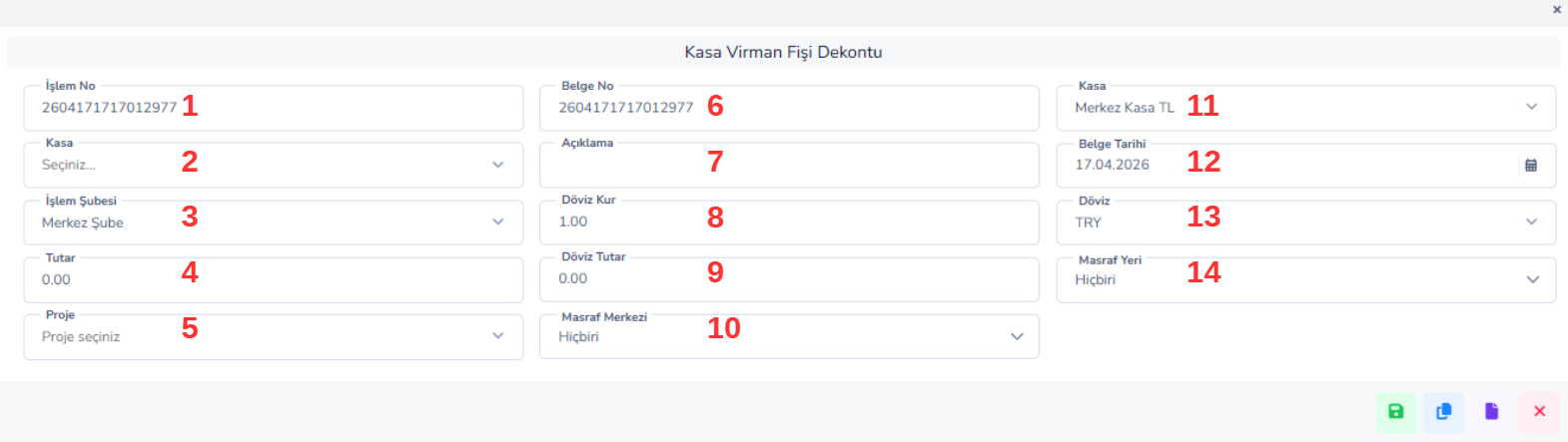
- Allows money transfer between safes
- Regulates cash balances
- Establishes balance between branches or different cash register types
Key Areas:
1.Transaction No / Document No: Record number of the transaction 2nd Cash: The safe from which money is withdrawn 3. Transaction Branch: The branch where the transaction took place 4.Amount: Amount of money transferred 5.Project: (If any) associated project 6th Explanation: Transfer description On the right:
7.Cash (Target): The safe to which the money is sent 8.Document Date: Transaction date 9.Foreign Currency / Foreign Exchange Rate / Foreign Currency Amount: For foreign currency transfers 10.Cost Center: Generally not used (optional) Usage Scenario Sending money from the head office to the branch cash register -> End of day cash arrangement -> Transfer between different foreign exchange cash registersÖKC TRANSACTIONS (PAYMENT RECORDER DEVICE TRANSACTIONS)
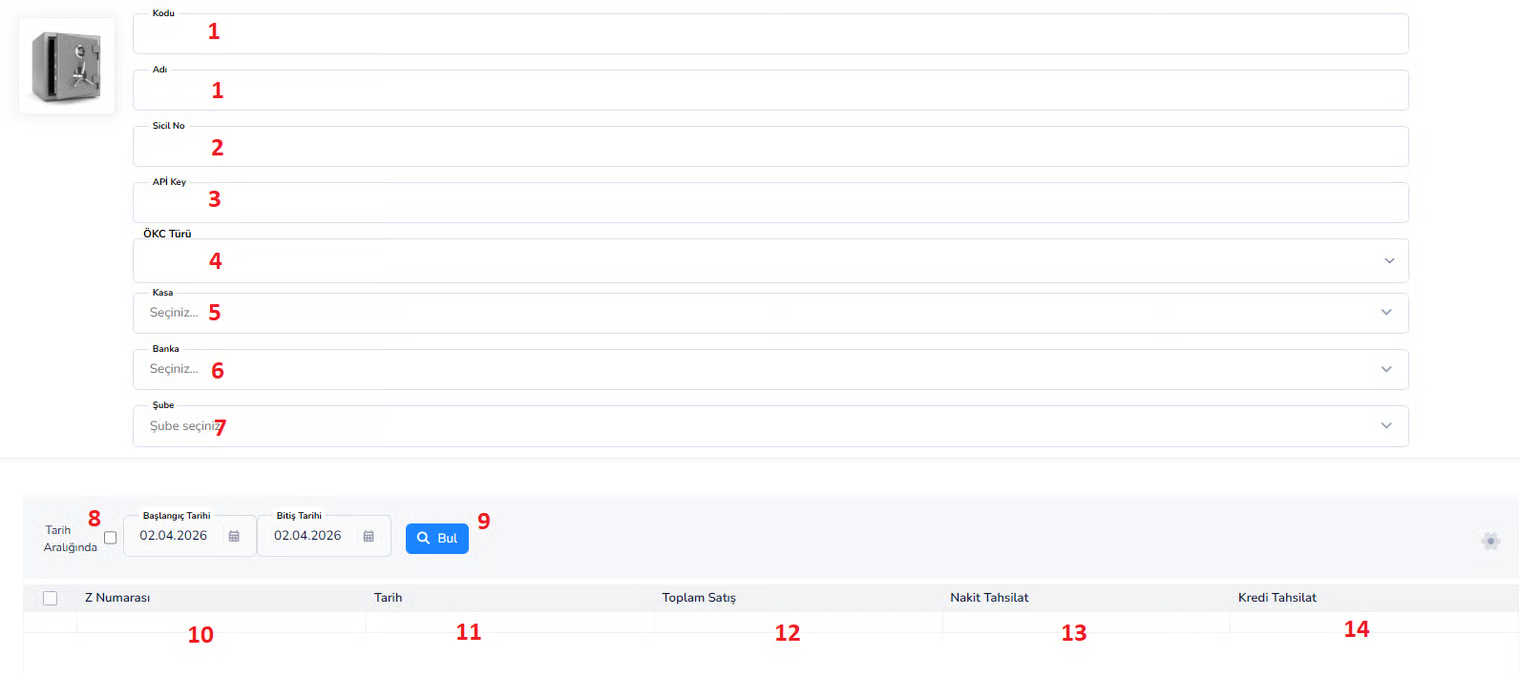
- Displays cash register (CHC) sales
- Follows daily Z reports
- Analyzes cash and credit collections
- Provides device-based sales control
Parents (Cookies)
1.Code / Name: Description of the ÖKC device 2.Registry Number: Official registration number of the device 3.API Key: Key used for integration (if any) 4.ÖKC Type: Device type (cash register, POS, etc.) 5th Safe: The safe it is connected to 6th Bank: POS connected bank 7th Branch: The branch where the device is locatedFiltering Area:
8.Date Range: Searching for transactions within a specific date range 9.Find Button: Brings data according to the filterSubTable (Report Area):
10.Z Number: End of day Z report number Date 11: Transaction date 12.Total Sales: Total daily sales amount 13.Cash Collection: Sales made in cash 14.Credit Collection: Sales made by card Usage Scenario Checking cash at the end of the day -> Seeing cash vs credit sales distribution -> Analyzing branch-based device performanceBu doküman yardımcı oldu mu?
Eksik veya geliştirilmesi gereken bir bölüm varsa destek ekibimizle paylaşabilirsiniz.